Automatic Expense Tracking: Set It Up Once, Benefit Forever
Your budget isn’t broken. Your data is.
Most people are trying to manage money with the financial equivalent of a foggy windshield and a half-dead wiper blade. You think you’re doing fine… until you check your bank account and it looks like a raccoon got into it.
And here’s why this matters: when your tracking is manual (or inconsistent), your “plan” is basically fan fiction.
Meanwhile, real life is expensive. A CNBC report found 60% of Americans are living paycheck to paycheck, 70% are stressed about finances, and only 45% have an emergency fund (CNBC). That’s not a budgeting problem. That’s a systems problem.
Automatic expense tracking is the system upgrade. You set it up once, then it quietly works in the background like a good Roomba: not perfect, but shockingly life-improving.Here’s the part nobody talks about: once your expense tracking is automatic, it becomes a compounding asset. Not in the crypto-bro “number go up” way, but in the “I stop bleeding money in places I didn’t even know I had veins” way.
What automatic expense tracking actually is (and what it isn’t)
Automatic expense tracking is simple: your transactions flow in from your accounts, get categorized consistently (often via rules), and generate clean insights you can actually use.
It is not:
- A magical force field that prevents you from buying $14 salads because “it’s basically self-care.”
- A one-time setup that never needs review again. (Nothing in adult life works like that, except maybe gravity.)
- A replacement for thinking. It’s a replacement for busywork.
When it’s done right, you stop spending your Sundays playing accountant, and start spending them doing literally anything else.
A quick story: meet Sarah, patron saint of “Where did my money go?”
Sarah is smart. She has a job, a 401(k), and the confidence of someone who once returned something to Costco.
She also had…
- A “free trial” that turned into a $19.99 monthly charge.
- A gym membership she kept “because guilt is motivation.”
- Three different streaming services, two of which were basically a shrine to shows she’ll never watch.
Sarah wasn’t irresponsible. She was uninformed at scale.
After she switched to automatic expense tracking, she didn’t suddenly become a monk. She just got visibility, then made a few surgical cuts and better decisions. The chaos wasn’t her personality. It was her tooling.
Quotable truth: You can’t improve what you refuse to look at, and you won’t look at what’s annoying to track.
The “set it up once” blueprint (45 minutes, one coffee, mild honesty)
You don’t need a 47-tab spreadsheet. You need a clean pipeline.
Below is a setup flow that works whether you’re coming from Mint, trying to beat Monarch Money’s complexity, or just sick of your current system gaslighting you.
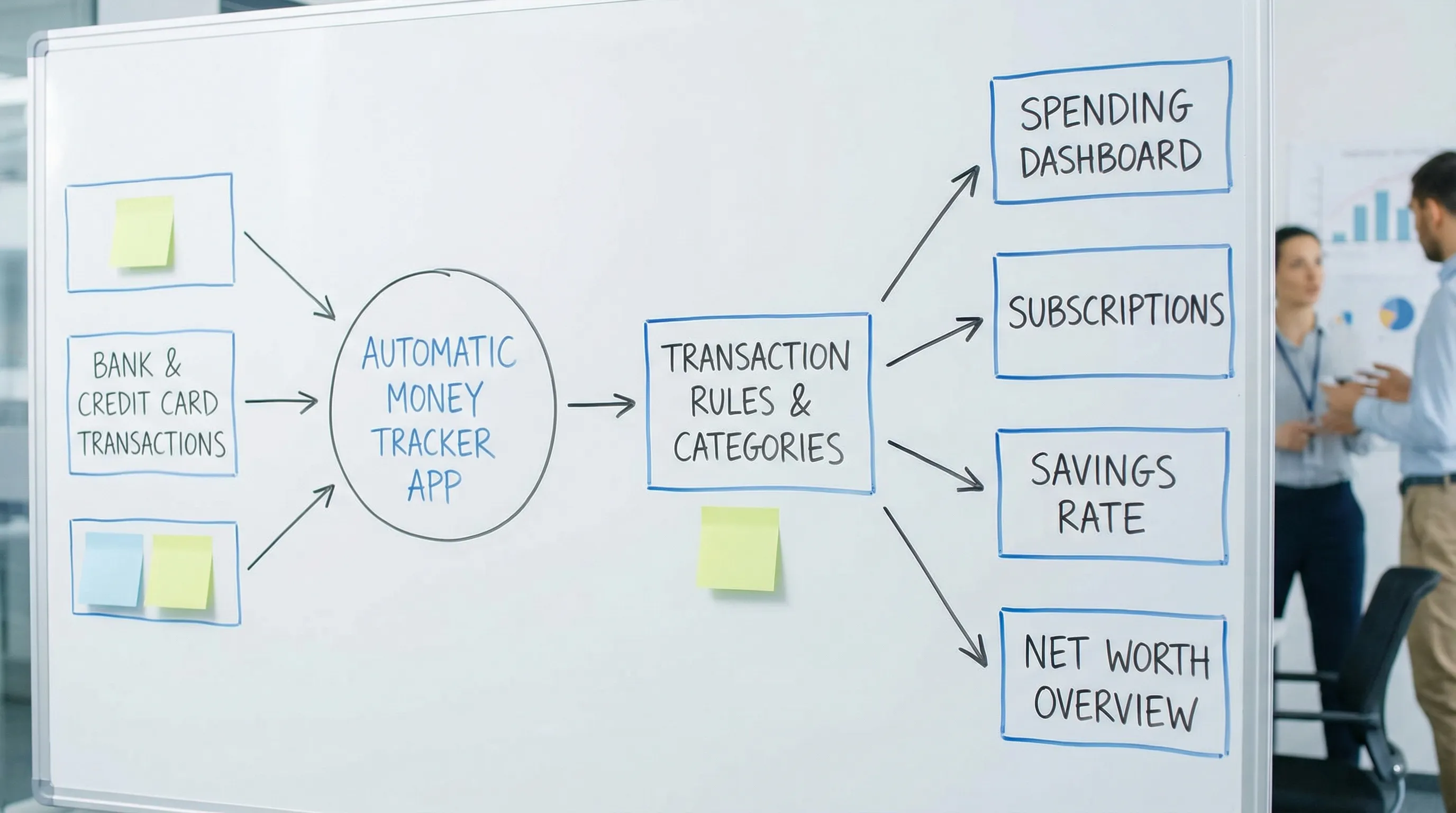
Step 1: Connect the accounts that actually run your life
Start with the “money-moving” accounts:
- Checking
- Credit cards
- Primary savings
Then add:
- Loans (student, auto)
- Mortgage
- Investment accounts (for net worth context)
If you are using FIYR, this is where you get the big win fast: income, expenses, subscriptions, and net worth start showing up in one place, instead of living across five apps and your brain.
Step 2: Build categories for decisions, not decoration
Most people mess this up by creating categories like they’re designing a museum exhibit.
Your categories should answer questions like:
- “Can I afford takeout this week?”
- “Why is my grocery spend climbing?”
- “How much are subscriptions costing me per month?”
A practical target is 8 to 12 core spending categories, plus a few “true expense” buckets (annual bills, car repairs, medical, etc.). If you want a clean template, FIYR’s approach to customizable categories is built for this style of tracking (and it’s a reason many former Mint users switch).
Helpful read: Budgeting Categories List: A Clean Setup That Works
Step 3: Create a “Needs Review” bucket (your sanity buffer)
Perfection is a trap. You want a safe landing pad for weird transactions.
Create a category like:
- Needs Review
- Uncategorized
- Weird Stuff
Your goal is to prevent one bad transaction from breaking your whole system. The point of automation is to reduce friction, not create a new religion.
Step 4: Add transaction rules so your categories stay clean
Rules are the secret sauce. They are how “automatic” becomes actually automatic.
Here’s a quick cheat sheet of common rule types:
| Rule type | Trigger example | Action | Why it matters |
|---|---|---|---|
| Merchant rule | “Spotify” | Categorize as Subscriptions | Recurring charges stop hiding in plain sight |
| Keyword rule | Memo contains “UBER” | Categorize as Transport | Catch inconsistent merchant names |
| Amount rule | Exactly $1.99 | Categorize as Fees | Surfacing death-by-a-thousand-cuts |
| Split logic (manual or supported) | “Amazon” order | Split into Household + Kids + Personal | Amazon is a category liar |
If you want to go deeper on rules, FIYR has a full guide on building them without breaking your data.
Recommended: Spending Rules Automation: Categorize Faster and Never Miss a Transaction
Step 5: Fix the biggest tracking lie, transfers
Transfers are not spending. They’re money moving from one pocket to another.
Classic examples:
- Credit card payments
- Transfers between checking and savings
- Brokerage deposits
If transfers get categorized as “expenses,” your spending chart becomes performance art.
If you use credit cards, this guide will save you hours and a few existential crises:
Step 6: Turn subscriptions into a first-class citizen
Subscriptions are the modern tax for being alive. They are also uniquely annoying because they are:
- Small enough to ignore
- Frequent enough to add up
- Automatic enough to become invisible
A good tracker should make subscriptions obvious, track recurring charges, and help you label them so you can decide, consciously, what stays.
If you want the deep dive: Best Apps to Manage Subscription Renewals
Quotable truth: If your subscriptions are on autopilot, your goals are not.
The maintenance rhythm that makes this “benefit forever” (10 minutes a week)
Automatic expense tracking isn’t “set and forget.” It’s “set and barely touch.” Huge difference.
The best system is boring, repeatable, and slightly smug.
Here’s a cadence that works for normal humans with jobs and laundry:
| Frequency | Time | What you do | Outcome |
|---|---|---|---|
| Weekly | 10 minutes | Categorize the leftovers in Needs Review, scan for surprises | Small fixes, no end-of-month panic |
| Monthly | 20 minutes | Check category totals vs budget caps, review subscriptions, verify transfers | Accurate month-end numbers |
| Quarterly | 30 minutes | Audit rules, update categories, label one-off events (travel, holidays) | Cleaner trends, better decisions |
This meshes perfectly with a simple “money check-in” ritual. If you want that playbook: Why You’re Overspending (And the One Habit That Could Save You $50,000)
Common failure points (and how to fix them like an adult)
Automatic expense tracking fails for predictable reasons. The good news is they’re fixable, and the fixes are mostly “define the rule once.”
| Problem | What it looks like | The fix |
|---|---|---|
| Amazon/Target/Costco chaos | Everything shows as “Shopping” | Use labels for context (for example, “New Baby” or “Kitchen Refresh”) and split when needed |
| Reimbursements | Work travel looks like lifestyle inflation | Create a Reimbursements category and label trips, then net it out |
| Cash spending | Your tracking misses small stuff | Track ATM withdrawals as “Cash” and optionally log major cash purchases manually |
| Shared expenses | Couples think they’re overspending | Use labels like “Yours/Mine/Ours” or “Shared” to keep it fair |
| Irregular income | Budget feels impossible | Use a rolling average income baseline and separate business vs personal categories |
If irregular income is your life, not a one-off, don’t brute force a W-2 system. Use a cash-flow system built for variability: Budgeting With Irregular Income: A Practical System That Actually Works
Why this matters for FIRE (and not just “being less broke”)
FIRE people love spreadsheets. Respect. Also, spreadsheets lie when inputs are stale.
Your FIRE number, savings rate, and FI timeline are only as good as your spending data.
The clean math looks like this:
- Savings rate (cash-flow style) = (Income − Expenses) ÷ Income
- FIRE target (quick shortcut) = Annual spending × 25 (the 4% rule shorthand)
If automatic expense tracking helps you reduce spending by even $200/month, that’s $2,400/year.
Using the 25× shortcut, that can lower your implied FIRE target by about $60,000.
Same income. Same investing. Just less money leaking out of your life.
If you want the full savings-rate context: What Is a Good Savings Rate? Real Benchmarks
Quotable truth: Your portfolio doesn’t need a miracle. Your spending needs a spotlight.
What to look for in an automatic expense tracking app (Mint trauma edition)
Not all “automatic” is created equal.
Here’s what actually matters when you’re choosing a tool, especially if you’re coming from Mint, Quicken, Monarch Money, Copilot, or Rocket Money:
- Customization: categories that match your life, not a generic template.
- Rules: so your tracking gets better over time.
- Subscription visibility: recurring charges should not be playing hide-and-seek.
- Net worth tracking: assets + liabilities, with the ability to track the weird stuff too.
- FIRE-friendly insights: savings rate and projections, not just “you spent money, congrats.”
- Clean interface: because if it feels like taxes, you will quit.
FIYR is built around that exact philosophy: flexible budgeting, custom categories and category groups, automatic transaction rules, subscription tracking, net worth tracking, plus savings rate and a FIRE date calculator based on your real data.
If you are still evaluating options, this is a solid framework: Spending Tracker App Checklist: What to Demand
Your 7-day automatic expense tracking jumpstart
You can do the full setup in one sitting, but most people do better with a short ramp so they don’t rage-quit.
- Day 1: Connect accounts, create core categories, add Needs Review
- Day 2: Clean up transfers, especially credit card payments
- Day 3: Add rules for your top 10 merchants
- Day 4: Label one “project” (trip, holiday, new baby, side hustle)
- Day 5: Review subscriptions and kill one you forgot existed
- Day 6: Set budget caps for the 3 categories that cause the most damage
- Day 7: Do a 10-minute weekly check-in and call yourself a responsible adult
If you want a guided version, start here: FIYR Budgeting Tutorial: Your First Week Setup, Step by Step
Frequently Asked Questions
Is automatic expense tracking accurate enough to trust? It’s accurate enough to drive great decisions, if you set up rules and do a short weekly review. The goal is consistent categories and clean trends, not 100% perfection. How do I handle cash purchases with automatic expense tracking? Track ATM withdrawals as a “Cash” category, then manually log only the big cash spends if you want precision. Most people don’t need to track every coffee bought with a wrinkled five. What about refunds and returns? Make sure refunds land in the same category as the original purchase, otherwise your category totals get distorted. If your tracker supports rules, create one for common refund merchants. Will this work if I have irregular income (freelance or gig work)? Yes, but you need a cash-flow approach: separate business vs personal categories, use a rolling average for baseline income, and track taxes intentionally. Does automatic expense tracking replace a spreadsheet for FIRE? It replaces the worst part of spreadsheets, the manual data entry and category chaos. Many FIRE folks still export data for custom modeling, but the tracking layer should be automated.Set it up once, then let your money tell the truth
Automatic expense tracking is not about becoming a budgeting robot. It’s about removing the dumb friction so you can focus on the decisions that actually move your life forward.
If you want a modern, Mint-era-free way to do this, FIYR is built for it: spending and income tracking, customizable categories, automatic transaction rules, subscription tracking, net worth tracking, and FIRE-focused metrics like savings rate and a FIRE date calculator.
Get your system installed, then keep it alive with a 10-minute weekly check-in:
- Start with the walkthrough: FIYR Budgeting Tutorial: Your First Week Setup, Step by Step
- Or explore more tactics in the FIYR blog: Blog - Fiyr
Because the ultimate flex is not budgeting harder. It’s needing to budget less because your system finally does its job.