 FIYR
FIYR Best Apps to Manage Subscription Renewals
If you are like most households in 2025, your subscriptions have multiplied faster than you intended. Streaming bundles, cloud storage, fitness apps, gaming passes, premium news, software, even meal kits, all renew on different dates and often at new prices. The result is a sneaky drain on cash flow. C+R Research reports that many consumers underestimate what they spend on subscriptions by more than one hundred dollars per month, which is money that could be compounding toward financial independence instead. Source: C+R Research, Subscription Services Study

This guide reviews the best apps to manage subscription renewals, including options that identify recurring charges, help you cancel what you no longer need, and connect decisions to your budget, savings rate, and FIRE timeline.
What great subscription-renewal management looks like
Before you choose an app, make sure it can do more than surface a list of services. The strongest tools usually provide a mix of the following capabilities:
- Comprehensive account coverage, connect all major bank, credit card, and brokerage accounts to catch recurring charges wherever they hit
- Reliable recurring-charge detection, surface monthly and annual renewals and flag trials before they convert
- Renewal and price awareness, help you see upcoming dates and changes in cost so you can decide early
- Cancellation help or guidance, make it easy to stop what you no longer want
- Budget integration, show how each subscription impacts your categories, safe-to-spend amount, and goals
- Custom categories and labels, tag charges in ways that match your life, for example label everything tied to New York Trip 2025 to see all costs in one place
- Long-term impact, quantify how trimming subscriptions improves your savings rate, net worth trajectory, and FIRE date
If your aim is financial independence, you want a tool that does both the micro job of managing renewals and the macro job of improving your plan.
The best apps to manage subscription renewals in 2025
Below are leading options, with a focus on how they handle renewals and how they fit into a broader money system.
FIYR, best for FIRE-focused subscription control and long-term planning
FIYR is a modern alternative to Mint, Monarch Money, Copilot Money, Rocket Money, and Quicken. It combines a full money tracker and spending tracker with subscription tracking and FIRE insights, which makes it ideal if you want renewals to connect directly to budgets, goals, and your independence timeline.
Key strengths for subscription renewals and beyond:
- Tracks income, expenses, and spending habits with clear charts and category rollups
- Subscription tracking that consolidates recurring charges across accounts
- Custom categories and automatic transaction rules so renewals land in the right buckets
- Custom labels for deeper insights, such as tagging all expenses for New York Trip 2025 across multiple categories
- Customizable budget features, including goal-based budgeting with a safe-to-spend balance
- Net worth tracking for nearly anything, add custom assets and liabilities for a complete picture
- Savings rate tracking with FIRE projection tools, see how canceling a subscription brings your FI date closer
For former Mint users, FIYR’s flexibility, transparency, and customization feel like a true upgrade. It is simpler and more affordable to operate than many premium tools, and more flexible than legacy desktop software.
Rocket Money, best for hands-off cancellations
Rocket Money (formerly Truebill) is widely known for detecting recurring charges and offering a cancellation concierge. If your top priority is getting rid of unwanted renewals with minimal effort, it is a strong contender. You also get spending insights, although long-term planning features are more limited compared to a FIRE-focused app.
Things to know: cancellation help can be valuable for hard-to-cancel services, and renewal awareness is a core use case. Pairing Rocket Money with FIYR can give you cancellation convenience plus a comprehensive plan for budgets, net worth, and FIRE.
Monarch Money, best for households that want collaborative budgeting
Monarch tracks recurring expenses across linked accounts and supports robust budgeting with a polished shared experience. It is useful for families who want a joint understanding of what renewals are coming and how those subscriptions fit into a broader monthly plan.
Things to know: it offers strong budgeting and net worth views. If FIRE tracking is a priority, complement Monarch’s budgeting with FIYR’s savings rate and FIRE date modeling.
Copilot Money, best for Apple-first users who want a sleek mobile experience
Copilot uses machine learning to categorize spending and surface recurring charges. It presents an elegant view of subscriptions and spending trends, especially on iOS and macOS.
Things to know: Copilot excels at daily spending feedback. If you want explicit FIRE projections and savings rate tracking tied to renewals, FIYR adds that layer.
Quicken Simplifi, best for forecast-oriented cash-flow tracking
Quicken Simplifi offers bill and subscription tracking with a forward-looking cash-flow view. It is helpful if you want to see how upcoming renewals affect next month’s balances.
Things to know: you get forecasting and budgeting in a familiar ecosystem. FIYR complements this with deeper FIRE analytics and flexible labeling.
Native app-store managers, essential for store-billed subscriptions
- Apple Subscriptions, manage App Store subscriptions directly from your Apple ID. This is the best place to cancel or switch Apple-billed apps quickly. Apple Support
- Google Play Subscriptions, manage Android app subscriptions billed through Google Play. Google Play Help
Things to know: these are limited to store-billed items, so you will still need a comprehensive finance app to see bank and card renewals in one place.
PayPal, useful if you authorize many autopays there
PayPal offers a hub for managing merchants with whom you set up recurring payments. It is a useful secondary tool if a lot of your renewals route through PayPal.
Things to know: coverage is limited to PayPal-funded charges, so use a money tracker for full visibility.
At-a-glance comparison
This summary reflects publicly available information as of December 2025. Always confirm current features with the provider.
| App | Cross-account tracking | Cancellation help | Budgeting tools | FIRE analytics | Custom labels or categories | Net worth tracking |
|---|---|---|---|---|---|---|
| FIYR | Yes | No | Yes | Yes | Yes | Yes |
| Rocket Money | Yes | Yes | Limited | No | Limited | No |
| Monarch Money | Yes | No | Yes | No | Yes | Yes |
| Copilot Money | Yes | No | Yes | No | Yes | Yes |
| Quicken Simplifi | Yes | No | Yes | No | Yes | Yes |
| Apple Subscriptions | No | Yes (store only) | No | No | No | No |
| Google Play Subscriptions | No | Yes (store only) | No | No | No | No |
| PayPal | Partial | Yes | No | No | No | No |
How to choose the right app for your situation
- You want cancellations handled for you, start with Rocket Money or a similar concierge-style app, then use FIYR to integrate the savings into your budget, safe-to-spend balance, and long-term plan
- You want a single tool that connects renewals to your savings rate and FIRE date, choose FIYR to get subscription tracking plus budgeting, net worth, and FIRE analytics in one place
- You manage money with a partner and want shared budgets, Monarch Money is strong for collaboration; FIYR adds FIRE modeling and flexible labeling for deeper analysis
- You are Apple-first and want a sleek daily view, Copilot Money for day-to-day subscription and spending detection; layer FIYR for savings rate tracking and independence projections
- You mostly care about store-billed apps, use Apple or Google Play directly for fast cancellations and pair with FIYR for a complete view across banks and cards
A 30-minute subscription cleanup with FIYR
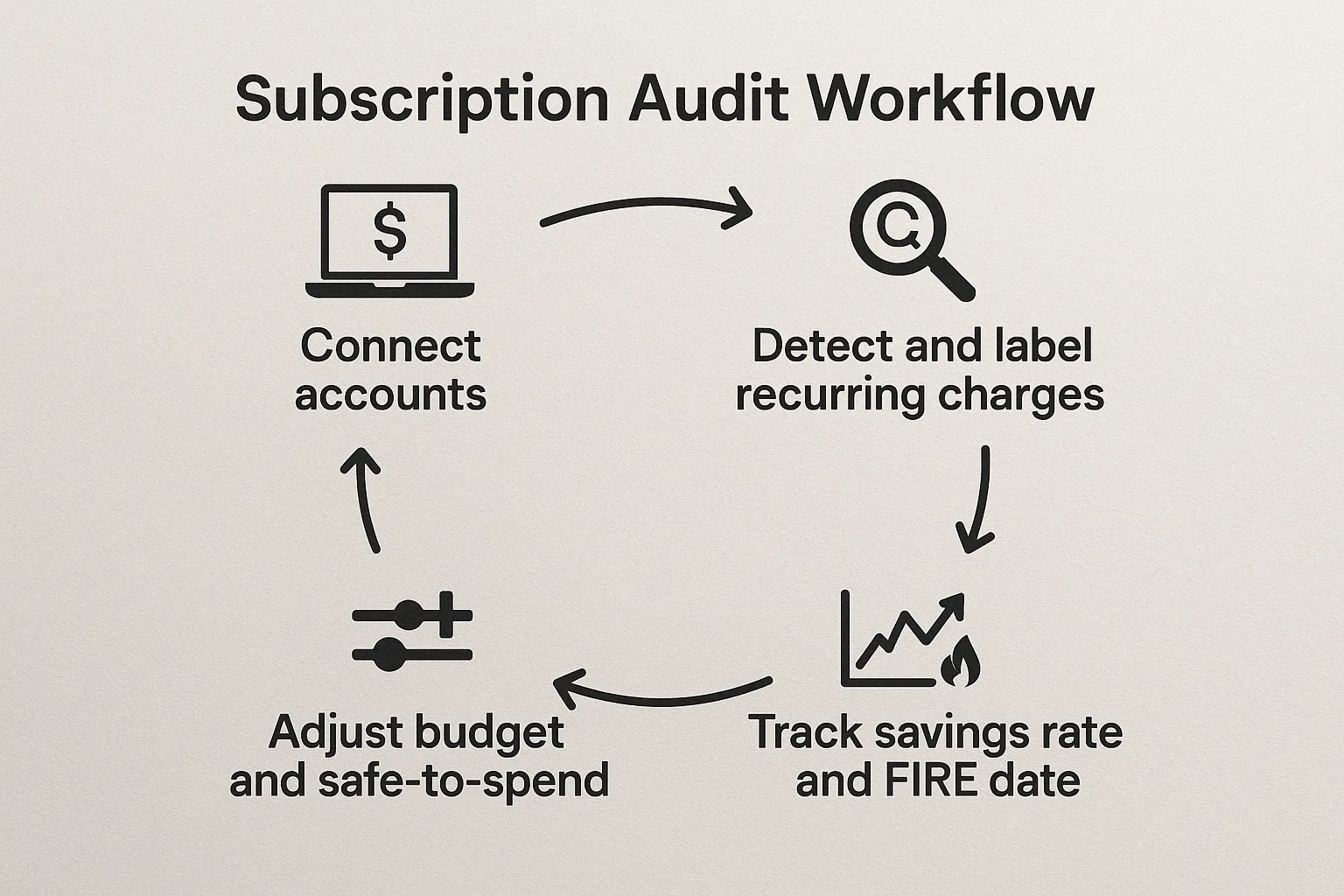
You can reclaim real dollars today, then translate that into lasting progress toward FIRE. Here is a simple workflow inside FIYR:
1) Connect all accounts. Bring in checking, credit cards, and any account where subscriptions hit. FIYR’s money tracker begins consolidating your income and expenses with clear charts.
2) Open the subscription view. Review recurring charges sorted by amount and upcoming date. Spot annual renewals that might be approaching in the next 30 to 60 days.
3) Classify with custom categories and transaction rules. Create or refine categories like Streaming, Cloud, Fitness, and set rules so renewals auto-classify going forward.
4) Add custom labels for context. Use labels to group related costs across categories, for example New York Trip 2025 to capture travel services, luggage insurance, and temporary app subscriptions in one analysis.
5) Right-size your budget, then check safe-to-spend. Update your budget categories to reflect what you actually want to pay, not what you paid last month. FIYR’s goal-based budgeting shows how cuts free up safe-to-spend for higher priorities like debt payoff or investing.
6) Track the savings rate impact. FIYR computes your savings rate automatically, so when you cancel or downgrade a subscription, you can see the change in real time and how it affects your FIRE date.
7) Capture the long-term effect. Use FIYR’s FIRE projection tools to see how reducing expenses speeds up your independence timeline. For example, cutting 35 dollars per month reduces your required FIRE portfolio by roughly 10,500 dollars using a 4 percent rule lens, since 35 multiplied by 12 divided by 0.04, and investing that 35 dollars monthly compounds the benefit. For background on the 4 percent framework, read our guide to the rule and limitations at Unlocking the 4% Rule. For a deeper savings rate primer, see Boost Your Savings Rate.
Pro tips to prevent unwanted renewals
- Build a renewal rhythm. Once a month, sort subscriptions by upcoming date and cost, and review any trials that will convert in the next billing cycle
- Use labels to track trials. Apply a Trial label and a target end date so those charges are easy to filter
- Prefer annual plans only when certain. Annual pricing can be cheaper, but switching costs and commitment risk increase, so test with monthly first
- Use virtual cards for trials. Virtual card numbers can limit renewals to a specific merchant and are easy to deactivate if you forget to cancel
- Consolidate where possible. Family or household plans can reduce per-user costs, check terms of service before sharing
- Watch for price increases. Review renewal emails and compare to last month’s amount in your spending tracker; if you see a jump, decide to keep, downgrade, or cancel
- Know your rights. The FTC has guidance on negative option and subscription marketing that requires clear disclosures and simple cancellation paths. This helps if you run into friction when canceling. FTC Negative Option Marketing
Why FIYR is a strong home base for subscription renewals
Renewal management is most powerful when it lives inside your full financial plan. FIYR brings your entire picture together:
- Income and expense tracking with spending insights so you see where money actually goes
- Subscription tracking that identifies recurring charges across accounts
- Custom categories, custom labels, and automatic transaction rules so your data reflects your life
- Customizable budgets, goal-based budgeting, and a safe-to-spend balance that updates as you make changes
- Net worth tracking for almost anything, add custom assets and liabilities to see the long-term effects of your decisions
- Savings rate tracking and FIRE projection tools that translate small monthly cuts into years off your FI timeline
If you are moving on from Mint or comparing alternatives like Monarch Money, Copilot, Rocket Money, or Quicken, FIYR offers more flexibility and transparency for planners, and simpler, more focused workflows for day-to-day tracking.
The bottom line
Managing subscription renewals is not only about canceling what you do not use, it is about aligning cash flow with your goals. Pick the app that matches your workflow, then put the savings to work. Whether you start with a cancellation concierge or go all in with FIYR’s integrated budgeting, net worth, and FIRE tools, the key is to build a repeatable process. Trim the bloat, track the savings rate improvement, and let compounding do the rest. For a step-by-step framework that ties renewals to your larger plan, explore our guides on Unlocking FIRE and the Step by Step Guide to Financial Freedom.