 FIYR
FIYR Spending Rules Automation: Categorize Faster and Never Miss a Transaction
Most budgets don’t fail because you’re “bad with money.” They fail because your transactions are a feral raccoon army, and you’re trying to hand-label each one while life happens.
Meanwhile, 60% of Americans are still living paycheck to paycheck. Not because they’re all reckless, but because modern finance is a thousand tiny paper cuts: subscriptions, delivery fees, split payments, “temporary” charges that become permanent roommates.
Here’s the uncomfortable truth: your numbers are only as smart as your categorization is consistent. And manual categorizing is where consistency goes to die.
Spending rules automation fixes that. It’s not sexy. It’s not a side hustle. It’s not a crypto chart. It’s just a system that quietly does the boring work, so you don’t have to.
What “spending rules automation” actually means (in human terms)
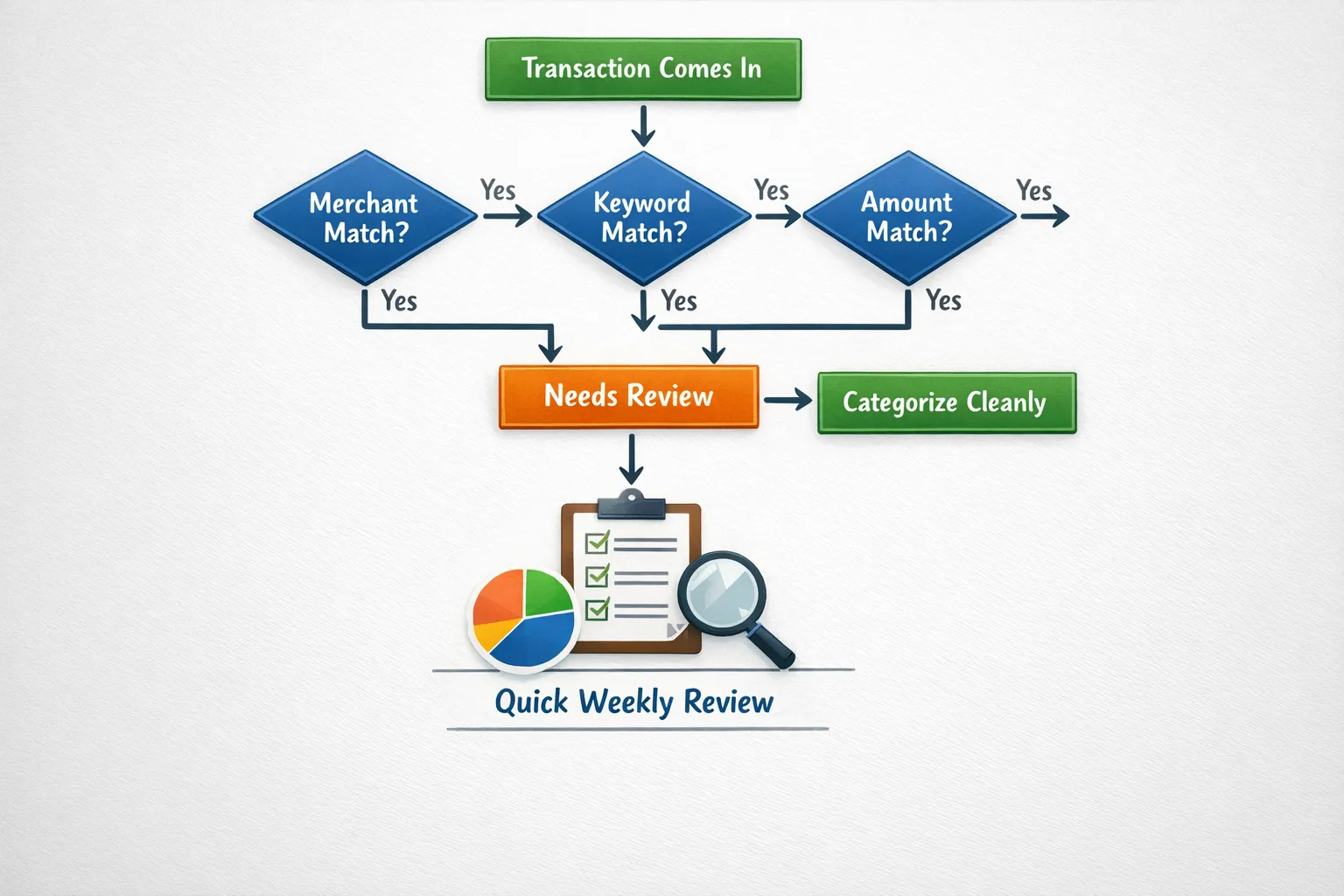
A spending rule is a simple if-this-then-that instruction for your transactions.
- If a transaction matches a merchant (like “Spotify”), then categorize it as “Subscriptions.”
- If the description contains a keyword (like “UBER”), then categorize it as “Transportation.”
- If the amount is exactly $1,200 and hits on the 1st, then categorize it as “Rent.”
The goal is not perfection. The goal is speed + consistency.
Because once your transactions reliably land in the right buckets, everything downstream gets easier:
- Your budget stops “mysteriously” blowing up.
- Your monthly review stops taking an hour.
- Your savings rate stops being a work of fiction.
Quotable truth: You don’t need more discipline, you need fewer decisions.
Why rules save you time (and your sanity)
Meet Sarah.
Sarah is smart, busy, and has a job that requires using words like “stakeholders” unironically. Every Sunday she swore she’d “do her budget.” Every Sunday she opened her money app, saw 83 uncategorized transactions, and suddenly remembered she needed to deep-clean the fridge.
Her problem wasn’t math. It was friction.
Rules remove friction in three ways:
1) They kill decision fatigue
The brain is not a reliable accountant after a long day. Categorizing a $6.42 charge from “SQ *SUNRISE MKT 4821” is not a moral test. It’s an energy tax.
Rules make the choice once, then repeat it forever.
2) They make your data consistent (which makes your insights real)
If “Chipotle” goes to “Dining” three times and “Groceries” once, your reports are lying to you. Not maliciously. Just… incompetently.
Consistency is how you spot patterns.
3) They catch transactions you’d otherwise miss
The most expensive spending category is “I didn’t notice.”
Rules can automatically funnel weird stuff into a review bucket, so you stop discovering surprises two months later like it’s an emotional plot twist.
One-liner: Automation is what happens when future-you stops trusting present-you.
The anatomy of a good spending rule
Rules sound fancy until you realize they’re basically a nightclub bouncer.
A good bouncer needs three things:
Trigger (what it matches)
Common triggers include:
- Merchant name
- Keywords in the description or memo
- Amount
- Account type (checking, credit card)
- Direction (expense vs income)
Action (what it does)
Common actions include:
- Set category
- Add a label or tag (like “Work Travel” or “New Baby”)
- Mark as a subscription or recurring
- Send to a “Needs Review” category
Exceptions (when it should not apply)
Because your life is not a clean dataset.
- Uber can be rides or Uber Eats.
- Amazon can be diapers or dumbbells.
- Venmo can be rent or “pizza from last night.”
A rule without exceptions is how you end up calling sushi “Utilities.”
The three rule types you’ll actually use
Most people don’t need 50 rules. You need the right 10 to 20. The ones that cover the repeat offenders.
Here’s the cheat sheet.
| Rule type | Best for | Example trigger | Example action | Watch out for |
|---|---|---|---|---|
| Merchant-based | Repeat purchases from the same brand | Merchant contains “Spotify” | Categorize as Subscriptions | Merchant names vary (SPOTIFY, SPOTIFY USA) |
| Keyword-based | Messy merchants and payment processors | Description contains “UBER” | Categorize as Transportation | Keywords can collide (UBER rides vs EATS) |
| Amount-based | Fixed bills, transfers, reimbursements | Amount equals $1,200 | Categorize as Rent | Inflation and plan changes break “exact amount” rules |
One-liner: Merchant rules are the sturdy furniture. Keyword rules are the duct tape. Amount rules are the laser pointer.
Merchant rules: the fastest win
If you do only one thing, do merchant rules.
These are your “set it and forget it” rules for transactions that should basically never move categories.
Examples (merchants)
- Merchant contains “SPOTIFY” → Subscriptions
- Merchant contains “NETFLIX” → Subscriptions
- Merchant contains “CHEVRON” → Gas
- Merchant contains “STATE FARM” → Insurance
- Merchant contains “COMCAST” → Internet
Pro tip: normalize your merchants
Some banks and credit card feeds add chaos like:
- “SPOTIFY USA”
- “SPOTIFY *PREMIUM”
- “PAYPAL *SPOTIFY”
If your tool supports it, match on the core string (like “SPOTIFY”) instead of the full name.
One-liner: Banks will describe a Starbucks charge like it’s a spy mission. Rules translate it back into English.
Keyword rules: when the “merchant” is basically a ransom note
Keyword rules are for transactions routed through platforms like PayPal, Stripe, Square, Toast, Shopify, Apple, Google, and other modern chaos engines.
Examples (keywords)
- Description contains “SQ *” → Category = Dining (or “Small Restaurants”)
- Description contains “TOAST” → Dining
- Description contains “PAYPAL” AND “UBER” → Transportation
- Description contains “APPLE.COM/BILL” → Subscriptions
Make keyword rules smarter with split keywords
If your system supports multiple conditions, use them.
- Contains “UBER” AND contains “EATS” → Dining
- Contains “UBER” AND does not contain “EATS” → Transportation
That one tweak prevents the classic mistake: classifying lunch as commuting.
One-liner: If merchant rules are the highway, keyword rules are the off-road tires.
Amount rules: powerful, but handle with care
Amount rules are best for:
- Rent or mortgage
- Payroll
- Childcare
- Insurance premiums
- Loan payments
But amounts drift. Prices go up. Plans change. You refinance. The bill becomes $127.43 instead of $126.19, and your “perfect” rule taps out.
Examples (amounts)
- Amount equals $1,200 AND posted monthly → Rent
- Amount equals $65.00 AND merchant contains “AT&T” → Phone
- Amount greater than $3,000 AND description contains “PAYROLL” → Income
Better than exact match: use ranges (if available)
- Amount between $55 and $80 AND merchant contains “AT&T” → Phone
Ranges future-proof your rules. Exact match rules are the financial equivalent of buying white sneakers.
One-liner: Exact amounts are brittle. Ranges are resilient. Be resilient.
“Categorize faster” is nice. “Never miss a transaction” is the real flex.
Speed is fun. Accuracy is wealth.
Most overspending isn’t one big mistake. It’s the slow leak you didn’t see:
- the subscription that renewed quietly
- the duplicate charge you never disputed
- the annual fee that hit when you were busy
- the “trial” that turned into a lifestyle
Rules help you build a safety net where weird transactions don’t hide.
The simplest safety net rule: create a “Needs Review” bucket
Set up one catch-all behavior:
- If category is blank or Uncategorized → Category = Needs Review
Then you only look at the outliers, not every transaction.
That’s how you get your weekly review down to 10 minutes instead of 45.
One-liner: You don’t need to watch every car on the highway. You need to stop the wrong ones at the border.
Real-world rule examples you can steal (without guilt)
Here are concrete examples by pattern, not by app, so you can adapt them anywhere.
Grocery stores that also sell everything (Target, Walmart, Costco)
These merchants are category chaos because they sell groceries, clothes, electronics, furniture, and the occasional kayak.
Use a default rule, then override big exceptions.
- Merchant contains “TARGET” → Household
- Amount greater than $150 AND merchant contains “TARGET” → Needs Review
This keeps 80% clean and flags the trips that might deserve a split.
Amazon, the black hole of budgets
Amazon is not a merchant. It’s a lifestyle.
Default it, then label intentionally.
- Merchant contains “AMZN” or “AMAZON” → Shopping
- Description contains “AMZN Mktp US” AND amount greater than $200 → Needs Review
If you use labels, this is where they shine:
- Label = “Home Project”
- Label = “Baby”
- Label = “Gifts”
Because “Shopping” tells you nothing. It’s basically “Money Left the Building.”
Fast food and coffee (a.k.a. the stealth tax)
Coffee is rarely about coffee. It’s about convenience, dopamine, and a five-minute break from existence.
- Merchant contains “STARBUCKS” → Coffee
- Merchant contains “DUNKIN” → Coffee
If you want to get spicy:
- If Coffee spending exceeds $X per week → Needs Review
Not to shame yourself. Just to notice.
Ride share vs delivery (Uber, Lyft, DoorDash)
- Contains “UBER” AND contains “EATS” → Dining
- Contains “UBER” AND does not contain “EATS” → Transportation
- Contains “DOORDASH” → Dining
- Contains “LYFT” → Transportation
Subscription creep (the silent killer)
- Merchant contains “NETFLIX” → Subscriptions
- Merchant contains “HULU” → Subscriptions
- Merchant contains “ADOBE” → Subscriptions
- Merchant contains “GOOGLE” AND contains “STORAGE” → Subscriptions
And one rule to rule them all:
- Category = Subscriptions AND amount greater than $30 → Needs Review
Because a $7.99 subscription is annoying. A $49.99 “business plan” you forgot about is a crime scene.
Refunds and reversals (aka your budget’s optical illusion)
Refunds often show up with weird descriptions.
- Description contains “REFUND” → Match category of original (or Needs Review)
If your tool can’t auto-match, at least ensure refunds aren’t categorized as income. They are not a raise. They’re your money coming home.
One-liner: A refund is not income. It’s your wallet getting its dignity back.
A simple framework: build rules in layers (so you don’t create a monster)
If you’ve ever tried to “organize” your finances and ended up with 47 categories and a minor identity crisis, this is for you.
Layer 1: lock down the repeatable stuff
Start with:
- Rent/mortgage
- Utilities
- Insurance
- Phone/internet
- Subscriptions
These are stable and high-volume.
Layer 2: clean up the messy platforms
Add keyword rules for:
- Square, Toast, Stripe
- PayPal
- Apple/Google billing
Layer 3: set traps for anomalies
Create rules that flag:
- Large amounts in common categories
- Any transaction that stays Uncategorized
- New merchants you have never seen before
That last one is how you catch fraud early, not after your bank sends you an email that basically says, “lol good luck.”
A “starter kit” rule map (by life stage)
Because your rules should reflect your actual life, not some spreadsheet influencer’s fantasy.
| If you are… | Your highest value rules | Why it matters |
|---|---|---|
| A former Mint user rebuilding your system | Merchant rules for bills + subscription rules + Uncategorized → Needs Review | Gets you back to clean data fast |
| A young professional | Coffee/dining defaults + rideshare split keywords + shopping review thresholds | These are the silent budget bloaters |
| A family with kids | Childcare rules + pharmacy rules + big-box “Needs Review” traps | Kid spending hides in plain sight |
| A freelancer/creator | Income keyword rules + tax savings labels + software subscriptions | Irregular income needs clean tracking |
| FIRE-focused | Rules that keep categories stable + labels for one-time events | Your savings rate should not be vibes-based |
One-liner: Rules are not about control. They’re about clarity.
How to test rules without breaking your budget reports
Rules are powerful. They are also dumb. That’s the point.
So test them like you’d test a parachute.
Use the “last 30 days” test
Before you lock anything in, scan your recent transactions and ask:
- Would this rule have categorized at least 10 transactions correctly?
- Did it misfire even once in a way that matters?
Prefer specific rules over broad rules
“Contains ‘AM’ ” is not a rule. It’s a cry for help.
Use:
- “Contains ‘AMZN’”
- “Contains ‘AMAZON’”
Add a single escape hatch
For any broad rule, include a review trigger:
- If amount greater than $X → Needs Review
That keeps the edge cases from poisoning your data.
The maintenance routine (10 minutes a month)
Rules aren’t “set and forget” forever. They’re “set and lightly maintain so future-you doesn’t send hate mail.”
Once a month:
- Sort transactions by Uncategorized or Needs Review
- Look for new merchants that repeat
- Convert repeats into rules
- Delete or adjust rules that misfire
If you want a simple metric: your goal is fewer “Needs Review” transactions each month.
One-liner: A great system gets quieter over time.
Rule precedence: decide which rule wins
Once you have more than a dozen rules, two of them will eventually match the same transaction. Decide the pecking order up front, the way you would with nested spreadsheet formulas: specific beats general, and anything that prevents double counting goes first.
| Priority | Rule layer | What it protects you from | Example |
|---|---|---|---|
| Highest | Transfers and card payments | Double-counted spending | Credit card payment treated as an expense |
| High | Bills and subscriptions | Hidden recurring leaks | Streaming, phone, insurance |
| Medium | Core merchants | Misleading merchant names | Costco, Amazon, Apple |
| Low | Context labels | Losing the “why” in your data | “NYC Trip 2026,” “Baby Prep” |
| Lowest | Needs Review catch-all | Silent errors | Anything new or weird |
Name rules so future-you can maintain them: MERCHANT | Category | Notes (for example, “AMZN PRIME | Subscriptions | Prime membership”). Keep one job per rule, and write known exceptions into the notes.
Debugging: when your rules go wrong
Even good rule sets drift. Match the symptom to the fix:
| Symptom | What’s really happening | Fix |
|---|---|---|
| Groceries looks too high | Costco and Target are swallowing household goods | Split with labels or tighten the merchant rules |
| Income is inflated | Transfers or refunds are counted as income | Add transfer and refund handling rules |
| Subscriptions seem low | Recurring charges land in Shopping or Digital | Add subscription merchant rules and review recurring charges |
| Too much in Misc | New merchants and edge cases are ignored | Route them to Needs Review and clear it weekly |
| Categories change month to month | Manual edits are overriding inconsistent logic | Prefer rules, minimize one-off recategorizing |
Watch broad keyword rules in particular: “contains APPLE” catches App Store subscriptions, but it can also catch an unrelated Apple Pay purchase.
Where FIYR fits (lightly, because you’re here to learn)
Spending rules automation works best in tools that let you:
- Create custom categories that match your real life
- Apply automatic transaction rules (merchant, keyword, amount)
- Review exceptions quickly with a “Needs Review” workflow
That’s the whole game: make the default automatic, and the weird stuff obvious. FIYR is built for that style of clean, consistent tracking (especially if you are coming from Mint and want less chaos and more control).
Frequently Asked Questions
What should I automate first with spending rules? Start with your high-frequency, low-ambiguity transactions: rent/mortgage, utilities, insurance, phone/internet, and your core subscriptions. These categories are stable and give you the fastest accuracy boost. Are keyword rules better than merchant rules? Not better, just different. Merchant rules are usually more reliable. Keyword rules are clutch when the “merchant” is a payment processor (PayPal, Square, Toast) or the description is messy. How do I handle Amazon, Target, and Walmart without messing up categories? Give them a default category (like Shopping or Household), then add an exception rule that flags big purchases (over $150 or $200) to a “Needs Review” category. You get clean data and still catch the outliers. Can amount-based rules cause problems? Yes, if you rely on exact amounts. Bills change and your rule breaks silently. If your tool allows ranges, use those. If not, keep amount rules limited to truly fixed payments and add a review threshold. What’s the easiest way to never miss a transaction? Create a system where anything Uncategorized (or anything that fails your main rules) automatically goes into “Needs Review.” Then do a quick weekly scan of only that bucket.The bottom line
Manual categorization is you doing unpaid labor for your bank’s terrible transaction descriptions.
Rules are how you get your time back and your data back.
Set a few smart automations, funnel the weird stuff into review, and your budget stops being a guilt machine and starts being what it should have been all along: a decision tool.
If you want to put this on easy mode, use a tracker that supports custom categories, rule-based automation, and a clean review workflow (FIYR is built exactly for that). Either way, the system is the win.
One-liner to take with you: Your budget doesn’t need more attention. It needs better defaults.