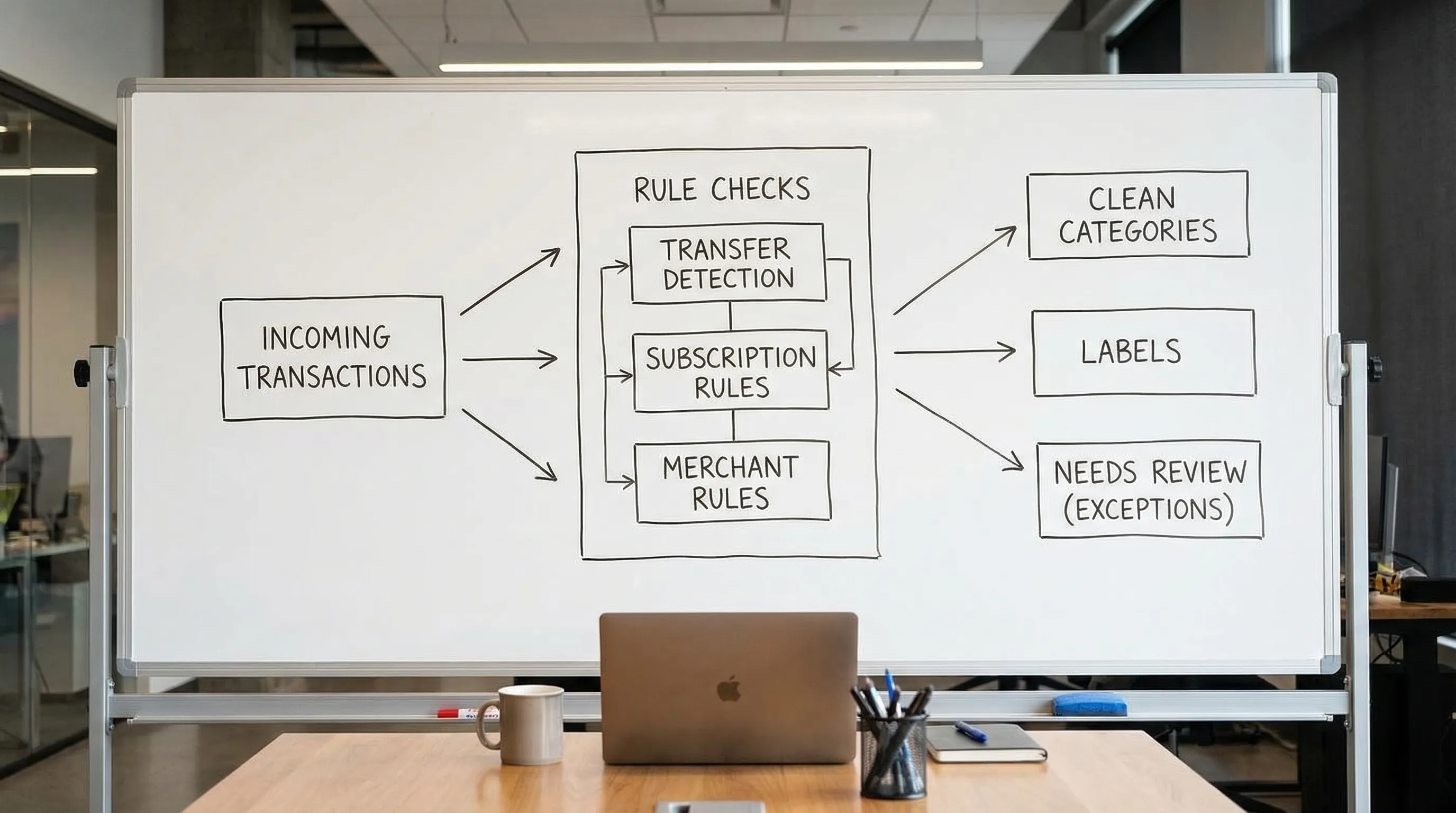
Finance Rules Engine: Automate Categories Like a Spreadsheet Wizard
If your budget feels “wrong,” there’s a solid chance your categories are lying.
Not because you’re bad at money, but because modern spending is basically a magician’s act: a charge hits your card as “SQ *SOMETHING,” Apple bundles half your life into one receipt, and Amazon looks like a single merchant even though it’s actually 400 different decisions you made at 1:12 a.m.
Meanwhile, you’re trying to build a clean picture of your finances with the same tools you use to track fantasy football.
And yes, it’s a real problem. CNBC reported that 60% of Americans are still living paycheck to paycheck. When the margin is thin, “close enough” categorization is not cute, it’s expensive.
Here’s the fix: a finance rules engine.
Not a buzzword. Not “AI vibes.” A boring, powerful, spreadsheet-grade system that turns messy transactions into clean categories automatically, consistently, and fast.
The mini-story: Alex, the Spreadsheet Wizard, gets humbled by 2026
Meet Alex.
Alex is that person with a color-coded spreadsheet, a net worth tab, and a pivot table that could qualify as a minor religion.
Then Alex tries to keep everything clean in real life:
- Amazon buys that include groceries, dog food, and a phone charger labeled “essential” in the moment
- A dozen subscriptions, some monthly, some annual, some “free trial” (famous last words)
- Venmo transfers that look like spending
- Credit card payments that get counted twice
Alex’s spreadsheet doesn’t break because Alex is dumb. It breaks because manual categorization is a tax on your attention, and attention is the scarcest asset you own.
A finance rules engine removes that tax.
What a finance rules engine actually is (in plain English)
A finance rules engine is a set of “if this, then that” instructions that automatically tags transactions.
Think:
- If merchant contains “Spotify,” categorize as Subscriptions
- If description contains “Payroll,” categorize as Income
- If it’s a transfer between your checking and savings, treat it as a transfer (not spending)
It’s the same logic you use in a spreadsheet:
- `IF()` statements
- lookup tables
- conditions
- exceptions
The only difference is you’re applying it to your money in motion, continuously.
Your budget isn’t a spreadsheet problem. It’s a systems problem.Why automation beats willpower (and why “manual” doesn’t scale)
Manual categorization fails for three reasons:
1) Inconsistency
You tag “Target” as Groceries on Monday and Shopping on Thursday. Your charts become modern art.
2) Drift
Your categories degrade over time. A little mess becomes a lot of “Misc,” and suddenly your budget is just vibes with bar charts.
3) Slow feedback
If you find out you overspent after the month ends, congrats, you just did financial autopsy instead of financial planning.
A rules engine gives you consistent categories, faster feedback, and cleaner metrics like savings rate, safe-to-spend, and FIRE projections.
Clean data is self-respect in spreadsheet form.The spreadsheet wizard mindset: build rules like you build formulas
Spreadsheet power users don’t “track.” They design logic.
A good finance rules engine borrows four spreadsheet instincts:
1) Precedence (which rule wins?)
If two rules match the same transaction, you need a pecking order.
2) Specific beats general
“AMZN Mktp” is too broad. “AMZN Prime” might be subscriptions. “AMZN Fresh” might be groceries.
3) Exceptions are normal
Rules are not laws. They’re defaults. Life will always find a loophole.
4) Test, don’t pray
Spreadsheet people don’t “hope” a formula works. They validate. Same here.
Here’s a practical precedence model you can steal:
| Priority | Rule layer | What it protects you from | Example |
|---|---|---|---|
| Highest | Transfers and payments | Double-counting spending | Credit card payment treated as expense |
| High | Bills and subscriptions | Hidden recurring leaks | Streaming, phone, insurance |
| Medium | Core merchants | Misleading merchant names | Costco, Amazon, Apple |
| Low | Context labels | Losing meaning in the data | “NYC Trip 2026,” “Baby Prep” |
| Lowest | Catch-all review bucket | Silent errors | Anything weird or new |
The building blocks of a rules engine (so you stop guessing)
Most finance rules engines, regardless of app, boil down to the same anatomy:
- Trigger: What you match on (merchant name, keywords, account, amount)
- Condition: The “when” logic (contains, equals, greater than, recurring)
- Action: What happens (assign category, apply a label, split)
- Scope: Where it applies (all accounts, one card, one bank)
- Priority: What happens when multiple rules match
In FIYR specifically, you get automatic transaction rules, plus custom categories and category groups, so you can build a taxonomy that actually reflects your life (not some default list dreamed up by a product manager who thinks “Shopping” is a personality).
If you’re coming from Mint, Monarch, Copilot, Rocket Money, or Quicken, this is the big upgrade: you’re not stuck with the app’s interpretation of your spending.
Rule patterns that work (with examples you can copy)
Let’s get concrete. Here are rule patterns that produce clean categories without turning your setup into a second job.
Pattern A: Merchant-based rules (your foundation)
Best for: consistent vendors
Examples:
- “Verizon” → Phone
- “State Farm” → Insurance
- “Trader Joe’s” → Groceries
This is the 80/20 of automation.
Pattern B: Keyword rules (for messy merchants)
Best for: generic processors, banks that truncate descriptions, app-store chaos
Examples:
- Description contains “UBER TRIP” → Transportation
- Description contains “PAYPAL *” and memo contains “PATREON” → Subscriptions
Keep these targeted. Keyword rules can be powerful and dangerous, like giving a toddler espresso.
Pattern C: Amount rules (for predictable repeats)
Best for: fixed bills that come through inconsistently labeled
Examples:
- Exactly $9.99 from Apple → Subscriptions
- Exactly $1,850 to landlord → Rent
Amount rules should be a last step, not your first. Prices change. Vendors get cute.
Pattern D: Context labels (what spreadsheets can’t do well)
Best for: tracking projects, life seasons, and “why”
Examples:
- Label: “Wedding 2026”
- Label: “Kitchen Remodel”
- Label: “Job Search Runway”
This is how you stop asking, “Wait, why did we spend so much in May?” and start saying, “Oh right, we did that whole human life thing.”
If you want more on category structure, pair this with FIYR’s guide to custom spending categories.
Categories tell you what happened. Labels tell you why.The “Rule Stack” framework: automate like a spreadsheet wizard, not a chaos goblin
Here’s the part nobody talks about: most people build rules in the wrong order.
They start with fun stuff (Starbucks rules) and ignore the landmines (transfers, refunds, card payments). Then their spending reports look like a crypto chart.
Build your rules in this order:
Layer 1: Eliminate fake spending
Focus: transfers, credit card payments, reimbursements
Goal: prevent double counting and phantom expenses.
If you want to go deeper on clean credit card handling, FIYR has a strong walkthrough on budgeting with credit cards without messy tracking.
Layer 2: Lock down recurring bills and subscriptions
Focus: anything that repeats monthly or annually
This is where people bleed quietly.
Bonus move: use subscription tracking to surface recurring charges, then write rules so they always land in the right bucket.
Layer 3: Fix your top 10 merchants
Focus: Amazon, Costco, Walmart, Apple, PayPal, Venmo, the usual suspects
These merchants create the most category distortion because they’re actually portals to many types of spending.
Layer 4: Add context labels for big life goals
Focus: trips, moving, baby, side hustle, medical year
This is how you keep your “normal monthly budget” from being hijacked by one-off life events.
Layer 5: Create a “Needs Review” catch-all
Focus: anything new, weird, or uncategorized
This is your safety net.
If you want the broader setup around automation and ongoing hygiene, see Automatic expense tracking: set it up once, benefit forever.
Automation without a catch-all is how errors become beliefs.A simple template: how to write rules you can maintain
Rules fail when they’re unmaintainable. You want rules that survive future you, tired you, and “I’m on my phone in line at Costco” you.
Use this naming convention:
- `MERCHANT | Category | Notes`
Examples:
- `TRADER JOES | Groceries | All locations`
- `AMZN PRIME | Subscriptions | Prime membership`
- `PAYROLL | Income | Employer name`
Then follow two rules of thumb:
- One rule should do one job. If it’s complicated, split it.
- Document exceptions in the rule name or notes. If you know it breaks sometimes, future you should know too.
Here’s a quick “maintenance rhythm” that doesn’t ruin your life:
- Weekly (10 minutes): clear “Needs Review,” fix new merchants
- Monthly (15 minutes): scan top merchants, confirm bills/subscriptions
- Quarterly (30 minutes): prune old rules, adjust for life changes
Your money system should take less time than your fantasy sports team. If not, something’s off.
Debugging: why rules engines go wrong (and how to fix them fast)
Even great systems drift. Here are common failure modes and the fix.
| Symptom | What’s really happening | Fix |
|---|---|---|
| Groceries looks too high | Costco and Target are swallowing household goods | Split with labels (Groceries vs Household) or tighten merchant rules |
| “Income” is inflated | Transfers or refunds are being counted as income | Add transfer/refund handling rules |
| Subscriptions seem low | Subscriptions are being categorized as Shopping or Digital | Create subscription merchant rules and review recurring charges |
| Too much in “Misc” | New merchants and edge cases are being ignored | Keep a “Needs Review” bucket and clear weekly |
| Categories change month to month | Manual edits and inconsistent logic | Prefer rules, minimize one-off manual recategorization |
One more pro tip: be careful with broad keyword rules.
“Contains ‘APPLE’” can catch App Store subscriptions, but it can also catch a random Apple Pay transaction that has nothing to do with Apple.
Specific wins. General loses. This is true in money and in dating.
The 25-minute setup: build a finance rules engine without becoming a full-time accountant
Put on a timer. Do this once. Then enjoy your life.
- Pull your last 60 to 90 days of transactions.
- Sort by merchant, highest frequency first.
- Identify:
- Top 10 merchants
- All recurring bills
- All subscriptions
- Transfers and credit card payments
- Build rules in the Rule Stack order:
- Fake spending first
- Recurring next
- Top merchants next
- Labels last
- Create 3 to 5 labels for your current season (examples: “Moving,” “Side Hustle,” “Travel 2026”).
- Add one catch-all category for weird stuff (“Needs Review”).
That’s it. No 47-tab spreadsheet required.
In FIYR, this workflow gets easier because you can combine custom categories, automatic transaction rules, subscription tracking, and a clean view of your income, expenses, net worth, and savings rate in one place. It’s the “spreadsheet brain” experience, without the spreadsheet maintenance debt.
The real payoff: rules engines don’t just save time, they save your goals
When categories are clean, everything else gets sharper:
- Budgets become real guardrails, not monthly retrospectives
- Your savings rate becomes measurable (and improvable)
- Your FIRE projections stop being fantasy math
- Subscription creep gets caught before it becomes permanent
Want the punchline?
Most people don’t overspend because they love wasting money.
They overspend because their system lets spending hide.
Build a finance rules engine, and your money stops playing hide-and-seek.
If you’re ready to go deeper on the mechanics, this pairs nicely with Spending rules automation: categorize faster and never miss a transaction.