Digital Budgeting vs Spreadsheets: Which Actually Wins in 2026?
You don’t have a budgeting problem. You have a tools that lie to you problem.
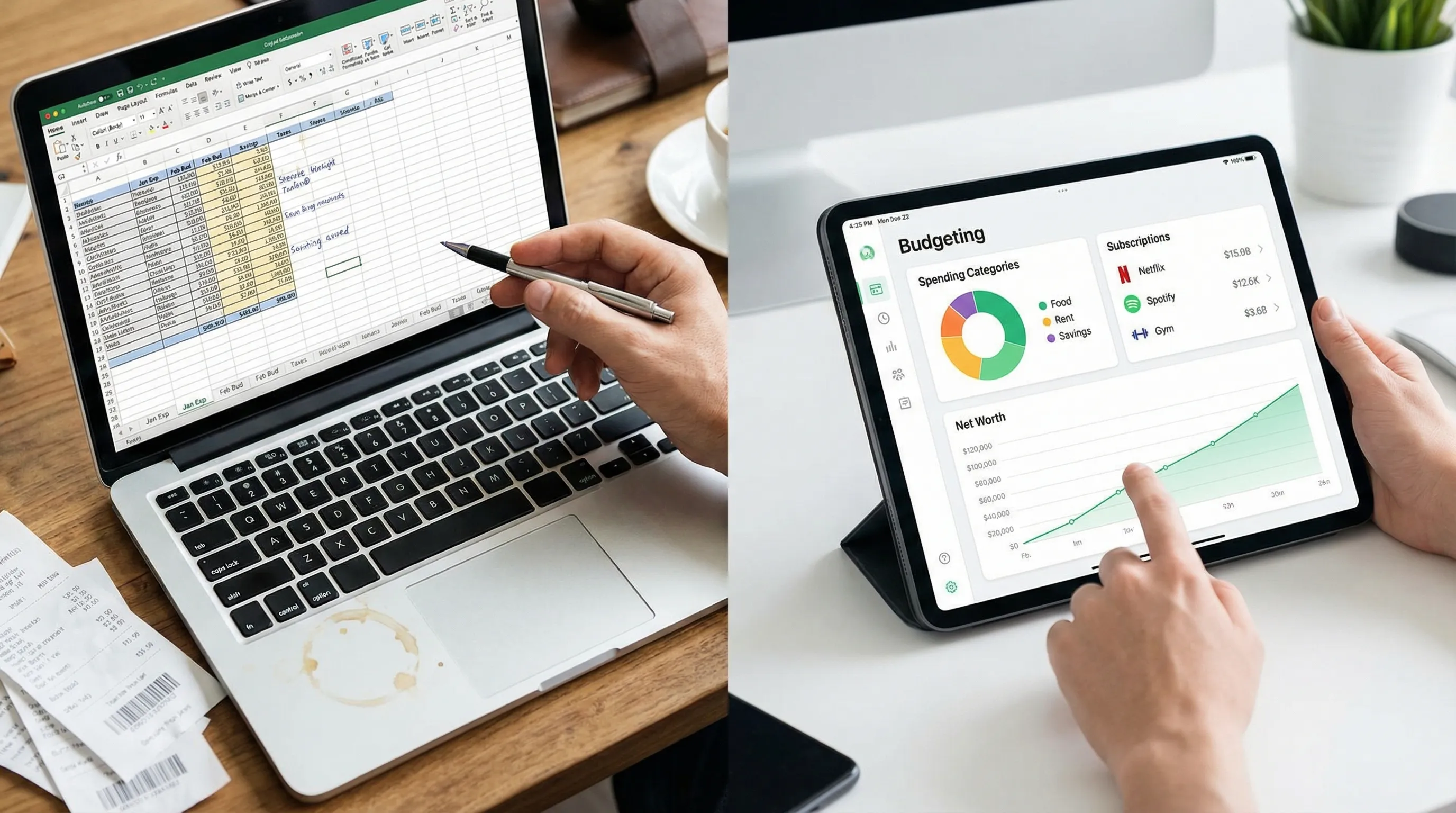
Spreadsheets are the original personal finance fantasy: clean rows, perfect formulas, and a comforting illusion of control. Digital budgeting apps are the modern fantasy: “Just connect accounts and you’ll become a responsible adult.”
In 2026, both can work. But only one wins for most people, most of the time.
Because the stakes are not “pretty charts.” The stakes are whether you’re part of the crowd that’s quietly panicking.
A CNBC report highlighted a brutal reality: 60% of Americans are living paycheck to paycheck, 70% are stressed about finances, and 61% carry credit card debt (average $5,875). Translation: money is already hard. Your system shouldn’t make it harder.
Here’s the part nobody talks about: the “best” tool is the one that keeps telling the truth when you’re busy, tired, traveling, parenting, freelancing, or simply pretending your DoorDash habit is “temporary.”
What you’re actually choosing in 2026
When people argue about digital budgeting vs spreadsheets, they’re usually arguing about features.
Wrong battlefield.
You’re choosing your operating system for three jobs:
1) Capture reality (what you really spend, not what you meant to spend)
2) Turn reality into decisions (what to do this week, not someday)
3) Stay alive during chaos (because life will absolutely body-slam your “perfect month”)
Spreadsheets can do job #2 beautifully. They’re elite at modeling.
Digital budgeting wins job #1 and #3, which is why it tends to win the whole game.
Quotable truth: A budget that only works when you’re at your laptop is not a budget, it’s a craft project.
Spreadsheets: why smart people love them (and why they break)
Let’s give spreadsheets their flowers.
Spreadsheets are:
- Customizable to an obsessive degree
- Transparent (you can see every formula)
- Great for scenario planning (FIRE timelines, debt payoff models, “what if we move?”)
- Portable in the sense that nobody can shut down Excel
Meet Priya.
Priya is a project manager, meaning she can run a multi-million dollar initiative but still somehow forgets her annual car registration exists until it shows up like a jump scare.
She built a beautiful spreadsheet. Tabs for spending, net worth, FIRE projection. Conditional formatting so gorgeous it should be framed.
Then life happened.
A few Uber rides, an unplanned vet bill, three subscriptions she swore she canceled, and a “quick Target run” that cost more than her first car. She fell behind on updates.
And her spreadsheet did what spreadsheets do best: silently drift into fiction.
The spreadsheet failure modes (aka death by a thousand tiny lies)
Spreadsheets usually fail in one of these ways:
- Manual entry fatigue: you miss transactions, then avoid looking, then the whole system becomes emotionally radioactive.
- Category inconsistency: “Dining Out” vs “Restaurants” vs “Food (Fun)” becomes a personality test.
- No real-time feedback: you find out you blew the month… at the end of the month. Cute.
- Version chaos: “Budget_2026_FINAL_v7_REALLY_FINAL.xlsx” is not a system, it’s a cry for help.
- Error stacking: one wrong copy/paste, one broken formula, and now you’re confidently wrong.
Quotable truth: Spreadsheets don’t judge you. They just enable you.
Digital budgeting: why it usually wins in 2026
In 2026, the average money life is messy:
- Multiple accounts (checking, savings, credit cards, HSA, brokerage)
- Subscriptions multiplying like gremlins
- Irregular income (freelancers, creators, commission roles)
- Payments flying through Apple Pay, PayPal, BNPL, and transfer chains
Digital budgeting tools exist for one reason: reduce friction between your real life and your financial truth.
That’s not a “nice to have.” It’s the whole point.
What digital budgeting gets right
A solid budgeting app can:
- Automatically track income and expenses so reality shows up even when you’re busy.
- Standardize categories (and let you customize them without breaking the whole model).
- Use transaction rules so the same merchant stops being a recurring math homework assignment.
- Track net worth (assets and liabilities) without requiring you to play accountant every weekend.
- Surface subscriptions so you can see recurring charges before they quietly unionize.
This is also why former Mint users keep searching for a modern replacement: they don’t miss Mint’s vibe, they miss automatic truth.
And then things get interesting: once truth is automatic, your decisions can be intentional.
The 2026 scorecard: digital budgeting vs spreadsheets
Here’s the cleanest way to compare, based on how real humans actually behave.
| Decision factor | Spreadsheets | Digital budgeting apps | Who wins (most people) |
|---|---|---|---|
| Ongoing time cost | High (manual upkeep) | Low to moderate (review, not entry) | Digital budgeting |
| Data freshness | Often weekly or monthly | Near real-time | Digital budgeting |
| Accuracy under stress | Drops fast | Holds up better | Digital budgeting |
| Custom categories | Yes (but you maintain it) | Yes (in good apps) | Tie |
| Automation (rules, recurring) | DIY scripts or manual | Built-in | Digital budgeting |
| Subscription visibility | Manual hunting | Often built-in tracking | Digital budgeting |
| FIRE progress tracking (savings rate, net worth) | Great modeling | Great tracking, some modeling | Depends (hybrid is best) |
| Sharing for couples | Possible, often painful | Usually easier | Digital budgeting |
| Privacy/offline control | Strong | Varies by tool | Spreadsheets |
| Scenario planning | Excellent | Improving, still limited | Spreadsheets |
If you want one sentence: Spreadsheets are better at planning your future, apps are better at telling you what you did five minutes ago.
In 2026, “five minutes ago” pays the bills.
The real winner is determined by your personality
You don’t need the “best” tool. You need the best tool for your failure pattern.
You should use spreadsheets if…
You’re the kind of person who:
- Enjoys tinkering and will actually keep a monthly close ritual
- Wants maximum control and minimal account syncing
- Mainly needs long-range modeling (FIRE scenarios, retirement projections)
Spreadsheets are great when you’re consistent.
They’re also great when you treat them like a monthly report, not a daily tracker.
You should use digital budgeting if…
You want:
- A system that survives busy weeks
- Less manual categorization and fewer errors
- Easy tracking across income, spending, subscriptions, and net worth
- A realistic path to better habits (not an aspirational Google Sheet)
Quotable truth: If your budget requires perfect behavior, it’s already dead.
The hybrid approach (the cheat code nobody regrets)
Here’s the move that quietly dominates in 2026:
- Use a digital budgeting app for tracking (automatic truth).
- Use a spreadsheet for projections (what-if modeling).
This solves the classic problem:
- Spreadsheets are amazing at “what if we save an extra $500/month?”
- Apps are amazing at “did we actually save $500 this month?”
If you’re pursuing FIRE, this combo is especially powerful because your timeline is driven by two very unsexy inputs:
- Your savings rate
- Your annual spending (burn rate)
A simple savings rate formula:
Savings rate = (Income − Spending) ÷ Income
Apps help you measure it with fewer lies. Spreadsheets help you play with the levers.
If you insist on staying in spreadsheets, do this or don’t bother
If you’re going spreadsheet-only, you need a system that is boring, repeatable, and hard to mess up.
The “Spreadsheet That Doesn’t Collapse” checklist
- One file. One. Not a family of files breeding in your downloads folder.
- One monthly close (30 minutes). Set a recurring calendar event.
- Import transactions (CSV from your bank or cards) instead of typing each one.
- Stable category list (10 to 15 categories max). If you need 47 categories, you need therapy, not Excel.
- A single “Needs Review” bucket for ambiguous transactions so you don’t stall.
- Two sanity checks:
- Spending total this month equals sum of categorized transactions
- Account balances reconcile (or you investigate)
You can absolutely win with spreadsheets. But you have to treat it like brushing your teeth: non-negotiable, not negotiable when convenient.
If you go digital, set it up like an adult (60 minutes)
Digital budgeting fails when people expect the app to do their thinking.
It won’t. It will just hold your data.
Here’s a tight setup sprint that actually sticks.
Step 1: Connect accounts and define your “truth source”
Pick what counts as real:
- Which accounts are in scope (checking, cards, loans)
- How you handle transfers (so you don’t double-count)
If you want a deeper dive into getting clean data, FIYR has a practical tutorial: FIYR Budgeting Tutorial: Your First Week Setup, Step by Step.
Step 2: Build categories that drive decisions
Your categories should answer questions like:
- “Can we eat out again this week?”
- “Are subscriptions quietly eating our raise?”
- “Is Amazon needs or wants?”
Not: “What does the IRS call this emotion?”
If you want a clean template, use: Budgeting Categories List: A Clean Setup That Works.
Step 3: Automate the boring stuff with rules
This is where digital budgeting separates itself from spreadsheets.
Set up transaction rules so your recurring merchants auto-categorize. Your future self will feel like they hired a tiny accountant.
FIYR’s rules-based approach is covered here: Automated Budgeting: How Rules Save Time and Keep Your Spending Accurate.
Step 4: Add a budget that bends instead of snaps
Most people don’t need a rigid zero-based budget. They need guardrails.
A practical structure:
- Fixed bills (predictable)
- Flex spending (variable)
- Goals (savings, debt payoff, investing)
If you want the flexible version (the one that survives real life), start here: Flexible Budgeting: Build a System That Bends.
Step 5: Turn on subscription visibility
In 2026, subscriptions are not “small.” They’re death by 12 premium tiers.
Digital budgeting makes it easier to:
- See recurring charges
- Tag them cleanly
- Cap them like a responsible tyrant
If subscriptions are a known leak, run this 30-minute cleanup: Reduce Subscriptions in 2026: A 30-Minute Cleanup Plan.
The underrated advantage of digital budgeting: feedback loops
Spreadsheets are “post-game analysis.”
Digital budgeting is “in-game coaching.”
That matters because behavior changes faster with tighter feedback loops. When you see spending patterns early, you can correct mid-month instead of doing the classic ritual:
- Overspend
- Feel bad
- Promise next month will be different
- Repeat forever
Quotable truth: You don’t need motivation. You need earlier warnings.
Where FIYR fits (without the cringe sales pitch)
If you’re looking at digital budgeting in 2026, you’re probably in one of these camps:
- Former Mint user who wants a modern replacement
- Someone who tried Monarch, Copilot, Rocket Money, or Quicken and thought, “This is close, but not quite me.”
- FIRE-focused and tired of guessing your savings rate
FIYR is built for the “tracking plus control” crowd:
- Income and expense tracking
- Budgeting with flexible options
- Custom categories and category groups
- Automatic transaction rules
- Subscription tracking
- Net worth and savings rate tracking
- Goal tracking with a safe-to-spend style signal
- A FIRE date calculator based on real user data
In practice, that means less time doing finance chores, and more time making actual decisions.
If you want a feature-first way to evaluate any tracker (including FIYR), use this: Spending Tracker App Checklist: What to Demand.
The verdict: which actually wins in 2026?
For most people: digital budgeting wins.
Not because spreadsheets are bad. Because humans are busy, money is emotional, and manual systems degrade.
Spreadsheets still win for:
- Deep scenario modeling
- Full offline control
- People who genuinely enjoy maintenance rituals
But if your goal is consistent progress, especially toward FIRE, the winning move is usually:
- Digital budgeting for daily truth
- Optional spreadsheet for long-term modeling
Final one-liner: In 2026, the best budget is the one that keeps working when you stop being your best self.
Frequently Asked Questions
Are spreadsheets or budgeting apps more accurate? Budgeting apps tend to be more accurate day-to-day because they automate transaction imports and reduce missed entries. Spreadsheets can be accurate too, but only with consistent manual upkeep. Is digital budgeting worth it if I’m living paycheck to paycheck? Yes, especially then. When margins are thin, you need faster feedback, clean categories, and visibility into recurring charges so small leaks do not become overdrafts. Can I do FIRE planning with a budgeting app? Yes. The key FIRE inputs are spending, savings rate, and net worth. A good app can track these reliably, and you can still export data to a spreadsheet for advanced scenarios. What’s the best approach for couples? Usually digital budgeting, because shared visibility and consistent categorization reduce arguments. The best system is the one both people will actually use. What if I don’t trust account syncing? You can still use an app selectively (track key accounts, review weekly, and export your data). The goal is reducing manual work while keeping control over what you share and track. ---Try a 7-day “truth test” (and stop budgeting on vibes)
Pick one system and run it for a week. Not a year. A week.
If you want the modern, FIRE-friendly digital budgeting route, FIYR is designed to replace the old-school Mint experience with more flexibility, cleaner customization, and automation that actually saves time.
Start by tracking spending, subscriptions, and net worth, then watch what happens to your savings rate when your data stops lying. Explore FIYR at blog.fiyr.app.