Finance Apps That Sync With Banks: The 2026 Reliability Guide
Most “budget apps” aren’t budget apps.
They’re bank-connection apps with a budgeting feature stapled on.
Because if your transactions don’t show up (or show up wrong), your budget becomes a motivational poster. Cute, useless, and quietly judging you.
In 2026, the real differentiator between money tools is simple: reliability. Not vibes. Not “AI.” Not pastel pie charts. Reliability.
Meet Alex.
Alex is a former Mint user who finally picked a replacement, connected accounts, and felt that sweet hit of adulting dopamine. Then, on Day 9, the credit card stopped syncing. On Day 12, half the transactions duplicated. By Day 20, Alex was back to spreadsheet purgatory whispering, “maybe I’m the problem.”
Alex is not the problem. The plumbing is.
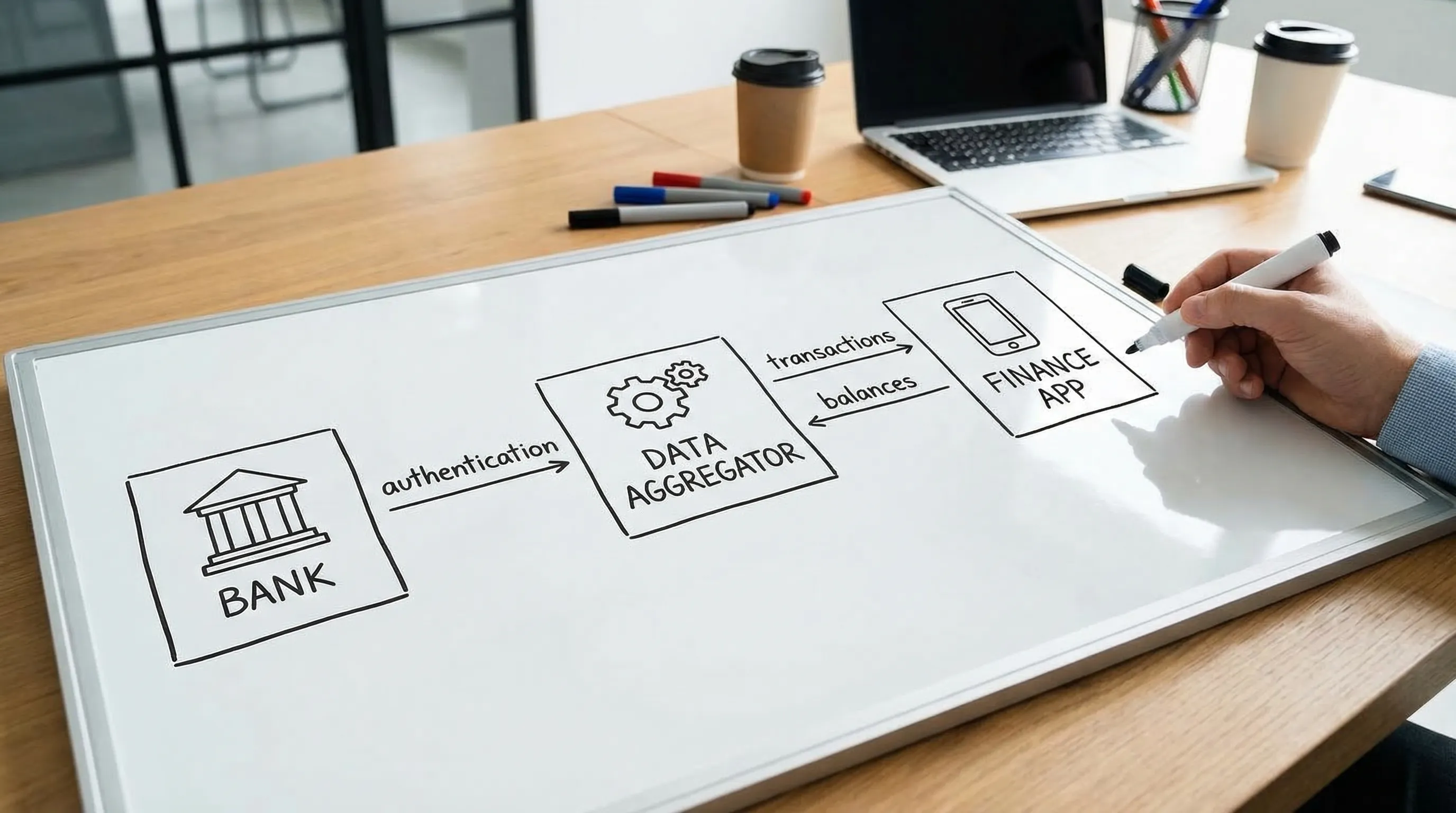
And here’s the part nobody talks about: bank sync reliability is a three-body problem. Your bank, a data aggregator, and the app are all involved. If any one of them sneezes, your budget catches a cold.
Let’s fix that.
Why bank-sync reliability matters more in 2026
Because money stress is already a national sport.
According to a CNBC report, 60% of Americans are living paycheck to paycheck, about 70% are stressed about finances, and 3 in 5 carry credit card debt with an average balance of $5,875. Only 45% report having an emergency fund, and among those, 26% have less than $5,000 saved. (CNBC)
When margins are thin, accuracy stops being a nerdy preference and becomes survival.
- A missed subscription charge becomes a late fee.
- A duplicated transaction becomes “why is my grocery budget on fire?”
- A broken connection becomes “I guess I’ll just… not look.”
Quotable truth: A budget doesn’t fail, the data feed does.
How finance apps that sync with banks actually work (and why they break)
Let’s demystify the magic trick.
Most finance apps that sync with banks rely on a middle layer, often called a data aggregator. Common examples in the U.S. include Plaid, Finicity, and MX (there are others). The aggregator connects to your bank, pulls your account data, and hands it to the app.
So your “sync” depends on:
- Your bank (its login flow, security rules, outages, how it labels transactions)
- The aggregator (how it connects, how fast it refreshes, how it handles MFA, how it maps fields)
- The app (how it stores, dedupes, categorizes, and displays the data)
If you’ve ever yelled “why can’t you just work?” at an app, congratulations, you were actually yelling at a small ecosystem.
The 2026 reality: OAuth is growing, but chaos isn’t gone
Banks are slowly moving toward more standardized, permissioned connections (often via OAuth-style flows, where you authenticate with the bank and grant access). That’s a good direction.
The Consumer Financial Protection Bureau (CFPB) has also been pushing forward consumer data access under Section 1033 (often discussed as “open banking” in the U.S.). That’s part of why this space keeps evolving. (CFPB)
But even with better standards, reliability still gets messy because:
- Banks change security and session rules constantly.
- Multi-factor authentication can expire tokens at inconvenient times.
- Some institutions throttle or block frequent refreshes.
- Transaction descriptions can be cryptic, inconsistent, or merchant-dependent.
Quotable truth: Your bank sync is only as stable as your bank’s mood.
The 2026 reliability scorecard (what to demand before you commit)
You don’t need perfect syncing. You need trustworthy syncing.
Here’s a practical scorecard you can use when evaluating any app.
| Reliability factor | What “good” looks like | How to test it fast |
|---|---|---|
| Connection stability | Accounts stay linked for weeks, not hours | Leave it alone for 7 days and see what breaks |
| Refresh consistency | New posted transactions appear predictably | Compare app vs bank for the last 3 business days |
| Pending vs posted handling | Pending is labeled clearly, posted replaces pending cleanly | Track one card purchase from pending to posted |
| Duplicate control | The same transaction does not show twice | Search a known purchase amount and merchant |
| Transfer logic | Transfers are not counted as spending | Check paycheck deposit, transfers, card payments |
| Merchant naming | Merchants are readable enough to make rules | Find 10 common merchants and inspect labels |
| Split transactions | Mixed-category purchases can be split | Test one Target, Costco, or Amazon order |
| Category accuracy over time | Categories don’t drift into “Misc” chaos | Review 50 transactions and look for patterns |
| Historical backfill | Pulls enough history to be useful | Confirm at least 90 days (or more) imports |
| Error transparency | Errors tell you what happened and what to do | Intentionally trigger a relink and see UX clarity |
This is the reliability cheat code: If the app can’t handle transfers, it can’t handle reality.
Quotable truth: A “smart budget” that double-counts card payments is just an anxiety machine.
The 7-day bank sync test drive (no spreadsheets, no coping)
If you’re switching from Mint or shopping between tools, don’t “choose.” Stress test.
Day 0: Connect like a grown-up
Connect the accounts you actually use:
- Primary checking
- Primary credit card
- Any loan you care about (student loans, auto)
- Any investment accounts you want reflected in net worth
Then do one thing most people skip: rename accounts clearly (for example, “Chase Freedom,” not “CARD-4839”). Future you will send a thank-you note.
Day 1: Run the “Reality Baseline”
Pick one statement period (or the last 30 days) and compare totals:
- Bank posted transactions count vs app count
- One high-frequency merchant (Starbucks, Amazon, Uber) matches cleanly
- One transfer (checking to savings, card payment) is not treated like spending
If the totals don’t match, do not gaslight yourself. The app has homework.
Day 3: Look for silent failure
Silent failure is the scariest kind because it feels like calm.
Check:
- Did the app stop pulling new transactions?
- Did it throw anything into a “needs review” state?
- Did pending transactions pile up without posting cleanly?
Day 7: Audit duplicates and drift
By Day 7, the common issues show themselves.
Scan for:
- Duplicate transactions
- Transfers categorized as expenses
- Refunds that look like income (or disappear)
- “Payment thank you” treated as spending
If you can’t trust a week, you can’t trust a year.
Quotable truth: The first week tells you the truth. The marketing page tells you a story.
Why your bank connection fails (and what to do about it)
Here’s a blunt table you’ll actually use.
| Symptom | Likely cause | What to do |
|---|---|---|
| Account needs relinking constantly | Token expiration, MFA resets, bank security change | Relink once, then see if it stabilizes. If not, consider switching connection method (if offered) or using a different institution account for day-to-day |
| Missing recent transactions | Bank delay, aggregator refresh lag, pending not supported | Compare posted (not pending) vs app. Give it 24 to 48 hours, then refresh or relink if still missing |
| Duplicated transactions | Bank posted + pending both imported, or aggregator replayed data | Merge or delete duplicates once, then watch for recurrence. If it repeats weekly, that’s a system issue |
| Credit card payment counted as spending | Transfer logic failure | Reclassify as transfer, set a rule so it stays clean (this is non-negotiable) |
| Venmo, Zelle, Cash App is chaos | P2P descriptions are vague | Use labels or rules keyed to keywords (Venmo, Cash App) and separate “transfer” vs “spend” consistently |
| “Amazon” ruins your categories | One merchant, infinite intent | Split transactions or use custom categories like “Amazon Needs” and “Amazon Wants,” then automate with rules |
| Net worth looks wrong | Missing liabilities, stale balances, duplicates | Confirm all debts are included, remove duplicate accounts, and set a monthly reconciliation cadence |
Notice the theme: most “sync issues” become “budget issues” because the app doesn’t help you normalize messy reality.
This is where rule automation and customizable categories stop being “power user” features and start being sanity features.
If you want the deeper system for keeping categories clean (especially after syncing chaos), this pairs well with FIYR’s guide on spending rules automation.
Quotable truth: The fix is rarely “work harder.” The fix is “design for messy data.”
Security: what “safe bank sync” actually means
Let’s be adults: there is no zero-risk digital life. You are currently one reused password away from becoming a cautionary tale.
That said, you can evaluate safety without needing a cybersecurity degree.
Look for signals like:
- Permissioned authentication flows when available (often bank-hosted login)
- Clear language about whether access is read-only (many tools aim for read-only data access)
- Transparent privacy policy, especially around sharing, selling, or using data for advertising
- Export and deletion controls (you should be able to leave without begging)
And please, for the love of compound interest, use:
- Unique passwords
- A password manager
- Multi-factor authentication on your email and banking
Quotable truth: Your budget app should not become your newest vulnerability hobby.
Reliability for FIRE people: garbage in, longer work life out
If you’re tracking savings rate, net worth, or a FIRE date, syncing reliability is not just convenience. It’s math.
A broken feed can:
- Inflate your savings rate (missing expenses)
- Understate your burn (missing bills)
- Lie about net worth (missing liabilities, stale asset values)
And then your FIRE timeline becomes a fantasy novel.
Here’s a simple guardrail that works even when syncing is imperfect: the monthly close.
Once a month, do a 10-minute audit:
- Compare app cash accounts vs bank balances
- Confirm credit card payments are transfers, not spending
- Scan for duplicates and missing large transactions
- Spot-check subscriptions and recurring bills
If you want a clean ritual, steal this workflow: Monthly net worth tracking.
Quotable truth: FIRE is just tracking, plus patience, plus not lying to yourself.
Where FIYR fits (without the hard sell)
If you’re coming from Mint, Monarch, Copilot, Rocket Money, or Quicken, you’re not just looking for “an app.” You’re looking for a system that:
- Keeps transactions organized even when bank data is messy
- Lets you customize categories so “truth” matches your life
- Uses rules to automate the boring stuff
- Tracks subscriptions so your recurring leaks stop doing parkour
- Connects spending to big metrics like savings rate, net worth, and your FIRE timeline
That’s the lane FIYR plays in: modern money tracking, flexible budgeting, and FIRE-focused insight in one place.
If your bank sync is the engine, FIYR’s value is the drivetrain: categories, rules, subscriptions, net worth, and goal tracking that turn raw data into decisions.
For a practical way to evaluate any tracker (including FIYR), use this companion checklist: Spending tracker app checklist.
Quotable truth: Sync gets you data. Systems get you results.

Quick take: what “reliable” should mean to you
Reliable doesn’t mean “never breaks.” This is finance tech, not gravity.
Reliable means:
- Breaks are rare
- Breaks are obvious
- Fixes are clear
- Data stays clean enough to trust your decisions
If an app makes you babysit it, it’s not a tool. It’s a pet.
Frequently Asked Questions
Which finance apps that sync with banks are the most reliable in 2026? Reliability depends heavily on your specific bank, the app’s data provider, and how the app handles duplicates, transfers, and pending transactions. The best approach is a 7-day test drive using the scorecard in this guide. Why do finance apps disconnect from banks so often? Disconnects usually come from security changes, MFA resets, token expirations, bank outages, or changes in a bank’s login flow. The app is only one part of the chain. How often should bank transactions update in a budgeting app? Many apps refresh multiple times per day, but timing varies by institution and connection method. For budgeting, what matters most is that posted transactions arrive consistently within a reasonable window (often 24 to 48 hours). Is it safe to link my bank accounts to a finance app? It can be, but you should verify the app’s privacy policy, authentication approach, and data controls. Use strong security hygiene like unique passwords and multi-factor authentication on critical accounts. What’s the biggest syncing mistake that ruins budgets? Misclassifying transfers, especially credit card payments, as spending. It inflates expenses and makes your categories look like a dumpster fire. Should I use manual tracking instead of bank sync? Manual tracking can work if you’re consistent, but it costs time and willpower. Most people do better with syncing plus a simple weekly or monthly review to catch issues.Ready to stop playing “Where did my transactions go?”
If you want a modern money tracker that’s built for clean categories, automation rules, subscription tracking, and FIRE-focused metrics (savings rate, net worth, and a realistic path to independence), FIYR is designed for exactly that.
Start with FIYR’s migration-friendly reads, then test-drive the system:
- Best Mint Alternative 2026
- Automatic expense tracking setup
- Why budgets fail (and how to fix yours in 2026)
Because the goal isn’t to track every penny forever.
It’s to trust your numbers enough to build a life you actually want.