Budgeting App With Custom Categories: Why It Matters
If your budget feels “fine” but your bank account keeps doing that magic trick where money disappears, you probably don’t have a spending problem.
You have a category problem.
Because categories are the language your budget uses to tell you the truth. And most people are budgeting in a language that sounds like this:
- “Shopping”
- “Misc”
- “Amazon”
- “Other”
That’s not a budget. That’s a shrug.
Meet Sarah. Sarah is smart, employed, and somehow still surprised by her own spending. Her budget said she spent $312 on “Shopping.” Cool. But “Shopping” is not a behavior. It’s a fog machine.
When we broke it into custom categories, “Shopping” turned out to be:
- $110 on skincare (the kind that promises “glass skin,” delivers “medium confidence”)
- $92 on Target “essentials” (seasonal candles are not essential, Sarah)
- $110 on “Amazon” (which was actually phone chargers, dog treats, and a book she never opened)
Same spending. Different reality.
And here’s the part nobody talks about: you can’t change what you can’t name.
Why custom categories matter (the grown-up answer)
A budgeting app with custom categories isn’t about being Type A. It’s about making your data usable.
Every category should answer a question you actually care about, like:
- “How much are we spending to feed ourselves, vs reward ourselves?”
- “How expensive is my commute, really?”
- “Is my ‘fun money’ quietly eating my retirement?”
- “Do I have a subscription problem or a self-control problem?”
Generic categories give you generic answers, and generic answers create generic results.
Custom categories turn your budget from a historical document (interesting, useless) into a decision engine (useful, occasionally uncomfortable).
The stakes are not cute
This isn’t about optimizing lattes. It’s about operating in an economy where the margin for error is thin.
CNBC reported that 60% of Americans are still living paycheck to paycheck, and financial stress is basically the national anthem at this point (CNBC). If your margin is tight, your categories need to be sharp.
Because when the money is tight, “Misc” becomes a financial weapon.
The real reason budgets fail: categories that don’t match decisions
Most budgeting tools ship with default categories that look logical, but behave like a junk drawer.
Here’s what happens:
- You categorize stuff just to get the app to stop yelling at you.
- Reports become muddy.
- Budgets become imaginary.
- You stop checking.
- Then you “randomly” overspend again.
It’s not that you’re bad at budgeting. Your system is asking your brain to do extra translation work.
And your brain’s like, “No thanks, I have 47 tabs open and one of them is anxiety.”
What custom categories actually do
Custom categories do three important things:
1) Reduce ambiguity: Less “where does this go?”
2) Increase accountability: “Dining Out” hits different than “Food.”
3) Expose patterns: Not once, but over months, which is where behavior change lives.
A budget without custom categories is like a fitness tracker that just says “Movement.”
Cool. But did you jog, or did you pace around the kitchen deciding if cereal counts as dinner?
The difference between categories and labels (don’t mix them up)
If you’ve ever created 48 categories and then abandoned budgeting forever, congratulations, you discovered the other trap: over-category-ing.
The fix is knowing what belongs where.
Use categories for repeatable decisions
Categories are for things you want to actively manage month to month.
Examples:
- Groceries
- Dining Out
- Gas
- Childcare
- Subscriptions
- Travel fund
- Student loan payment
Use labels for one-off context
Labels are for slicing data without creating category chaos.
Examples:
- “New York Trip 2026”
- “Kitchen Remodel”
- “Baby Prep”
- “Side Hustle Launch”
A good mental model: categories are drawers, labels are sticky notes.
And yes, your budget should have fewer drawers than your kitchen.
What to look for in a budgeting app with custom categories
A “custom category” feature is only useful if it’s paired with a system that keeps those categories clean over time.
Here’s what matters most:
1) Category groups (so your budget isn’t a junk drawer)
You want the ability to group categories into something like:
- Fixed bills
- Variable essentials
n- Lifestyle
- Financial goals
- True expenses (annual, irregular, sneaky)
This helps you see your spending in layers, not confetti.
2) Rules and automation (so you don’t manually categorize your own life)
If the app can’t auto-categorize recurring merchants and patterns, you’ll eventually quit. Not because you’re lazy, but because you have a job and would like to keep your remaining neurons.
3) Flexible budgeting (because life refuses to be a spreadsheet)
Custom categories shine when your budgets can adapt. Example: “Dining Out” can have a cap, but you can also let it flex when life gets chaotic and you need pad thai for emotional stability.
4) Reporting that respects your choices
If you build custom categories and the reporting still buckets them into “Other,” that app is disrespecting you.
The Custom Category Framework (steal this)
You don’t need 50 categories. You need the right 12 to 20.
Here’s a clean framework that works for most people, including ex-Mint users migrating to a modern tool.
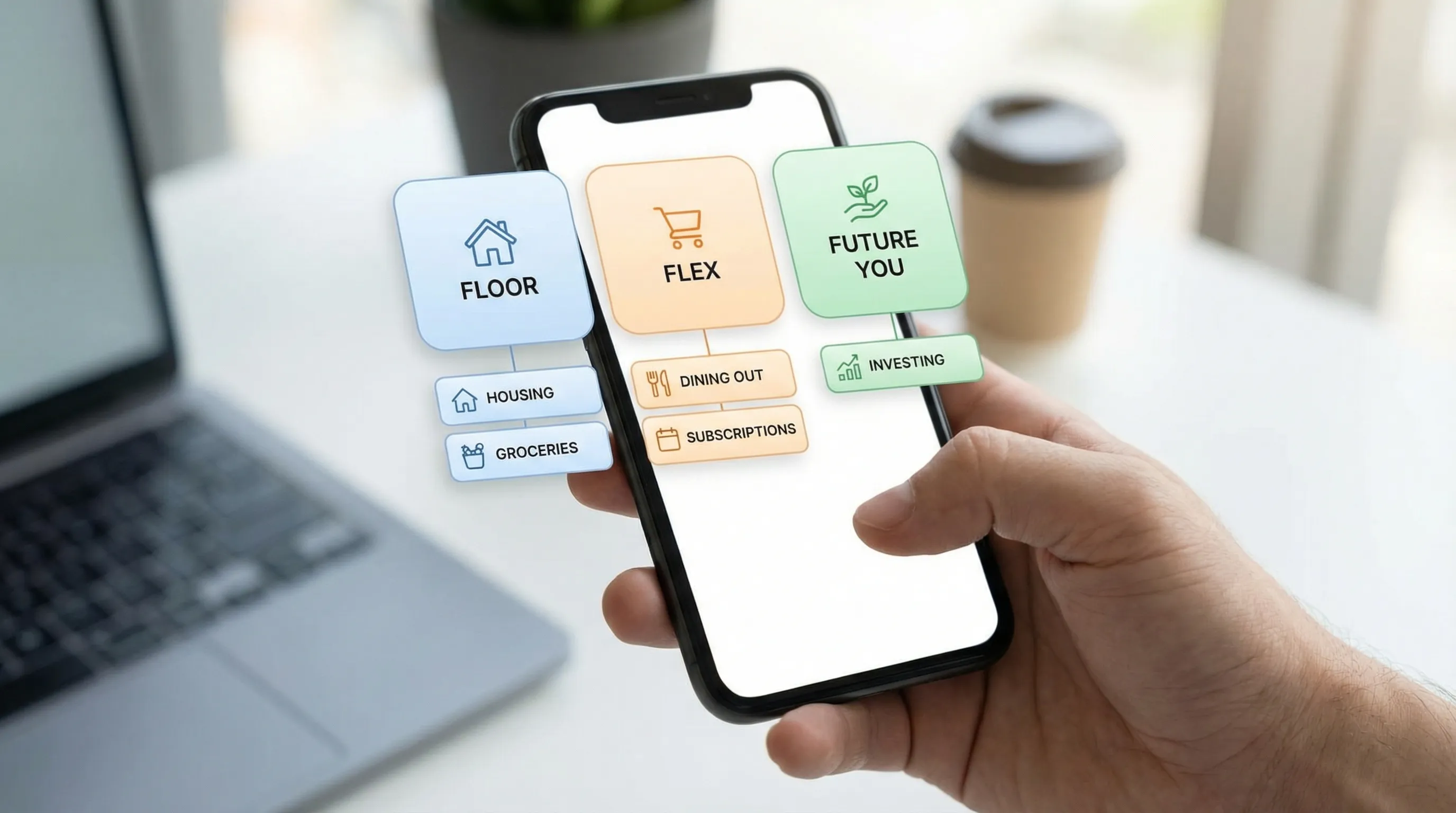
Step 1: Start with your “Big 3” buckets
Think of these as the headline of your financial life:
- Floor: must-pay, must-live (housing, utilities, insurance, minimum debt payments)
- Flex: variable spending you can steer (groceries, dining out, shopping, fuel)
- Future You: saving, investing, debt payoff above minimums
If your categories don’t roll up into these, you are building a museum, not a budget.
Step 2: Create “decision categories,” not “merchant categories”
“Amazon” is not a category. It’s a distribution center.
Instead, create categories that reflect intent:
- Household supplies
- Kids
- Personal care
- Work expenses
Then use rules (or a quick review habit) to route transactions correctly.
Here’s a simple table of what this looks like in real life:
| Generic category | Better custom category | The question it answers |
|---|---|---|
| Shopping | Household supplies | “Am I buying stuff we use, or stuff we store?” |
| Food | Groceries vs Dining out | “Are we feeding ourselves or paying for convenience?” |
| Bills | Subscriptions | “How much is recurring life costing me monthly?” |
| Auto | Commute (gas, transit, parking) | “What does it cost me to have a job?” |
| Misc | True expenses buffer | “Are irregular costs breaking my month?” |
When categories answer questions, your budget becomes actionable.
Step 3: Add 1 “Truth Serum” category
This is the category that reveals your actual behavior.
Options:
- Convenience spending
- Treats
- Impulse buys
- “I deserved it”
Pick one. Track it for 60 days. It will change your brain.
Because nothing kills a spending habit faster than naming it.
Step 4: Create a “Needs Review” catch-all (on purpose)
This is where weird transactions go until you decide.
The point is not perfection, it’s containment.
A catch-all category that you intentionally review weekly is a pressure valve. A catch-all category you ignore is how budgets die.
Step 5: Build categories for irregular expenses (the budget assassins)
If you only budget monthly bills, you’re budgeting the easy part.
The pain comes from:
- Annual insurance
- Car repairs
- Holiday spending
- Kids birthdays
- Medical bills
- Travel
These should get their own “true expense” categories (or sinking funds) so they stop ambushing you.
Your budget shouldn’t swing like a crypto chart.
Mini-playbooks: custom categories that solve real problems
If you’re a former Mint user
Mint trained a lot of people to accept default categories and then blame themselves when the numbers were messy.
A better setup:
- Add custom categories for the merchants Mint always mangled (Amazon, Target, Costco, Venmo)
- Create a “Subscriptions” category and force every recurring charge into it
- Create one label for each big season of life (“Move 2026,” “Wedding,” “New Baby”)
The goal is to preserve your sanity while upgrading your precision.
If you have irregular income (freelancers, creators, commission)
Custom categories are non-negotiable here because your cash flow is basically jazz.
Use category groups like:
- Business income
- Business expenses
- Taxes
- Owner pay
Even if you’re not running a full business budget, separating personal and work flows will stop your reports from lying to you.
If you’re chasing FIRE
FIRE is math, yes, but it’s also measurement.
Custom categories help you cleanly track:
- Your real spending (which determines your FI number)
- Your savings rate (which determines your timeline)
- Lifestyle creep (which determines whether you actually win)
If your categories are sloppy, your FIRE plan becomes fan fiction.
How FIYR makes custom categories actually usable (not just “available”)
A lot of apps technically let you create custom categories, like a gym membership technically lets you deadlift. The question is whether you will.
FIYR is built for people who want categories to stay clean without turning budgeting into a part-time job:
- Custom categories and category groups so your setup matches your life, not the app’s assumptions.
- Automatic transaction rules so your categories stay consistent (the holy grail of budgeting).
- Subscription tracking so recurring charges don’t quietly multiply like gremlins.
- Net worth tracking (assets and liabilities) so you see progress beyond one month’s spending.
- Savings rate tracking and FIRE insights so your categories connect to the bigger mission.
- Goal tracking and a safe-to-spend balance so you can spend with confidence, not vibes.
If you want the deeper mechanics of keeping categories clean long-term, pair this article with:
- Error-proof categorization strategies
- Spending rules automation (so you stop doing this manually)
- A clean, practical category setup you can copy
A 20-minute “Custom Categories Reset” you can do this week
Do this once and your budget will instantly feel less fake.
- Pull your last 60 to 90 days of transactions.
- Find your top 10 merchants by spend.
- Create 3 to 6 custom categories that reflect intent (not merchant names).
- Add a “Subscriptions” category and move every recurring charge into it.
- Add one “Truth Serum” category (Treats, Convenience, Impulse).
- Add “Needs Review” for anything unclear.
- Set 5 rules for your most common merchants.
- Schedule a 10-minute weekly review to clean up the leftovers.
That’s it. No budgeting cosplay. Just a system that tells you the truth.
The punchline
Your budget doesn’t need more discipline.
It needs better definitions.
Because when your categories are vague, your goals are vague, and your outcomes are vague.
A budgeting app with custom categories is how you stop guessing, stop rationalizing, and start making decisions like someone who actually wants financial independence.
Name the money. Then move the money.