 FIYR
FIYR Error-Proof Budgeting: How FIYR Keeps Spending Categories Clean
Most budgets fail for a very dumb reason, your categories lie. If your coffee run gets filed under Groceries and your credit card payment shows up as “Spending,” your numbers are a funhouse mirror, not a plan. That is why you feel broke even when the spreadsheet says you are fine.
Quick reality check. According to CNBC, roughly 60 percent of Americans still live paycheck to paycheck, even amid rising wages. That is not just an income story, it is a visibility story. If your categories are muddy, your savings rate is fantasy, your FIRE date is fiction, and your “safe to spend” is a trap.
Meet Kevin. Kevin swore he only ate out “twice a week.” FIYR showed him DoorDash, Starbucks, and “work lunch” were scattered across Groceries, Miscellaneous, and Uncategorized. Once we cleaned his categories, his Eating Out jumped from 240 dollars to 612 dollars. His budget wasn’t broken, his categorization was. And then things get interesting.
The 7 categorization mistakes that quietly wreck your budget
Here is the rogues’ gallery, and how each one distorts your reality.
1) P2P payments treated like spending, Venmo, Cash App, Zelle to yourself or your partner get tagged as “Food” or “Misc.” Result, phantom expenses and a sadder savings rate.
2) Credit card payments counted as expenses, the payment is a transfer to debt, not new spending. Result, double counting that nukes your monthly totals.
3) Refunds and reimbursements booked as income, you return shoes to Nike, your numbers show a pay raise. Result, inflated income and a fake savings boost.
4) Subscriptions scattered across random categories, Disney+ under Entertainment, iCloud under Utilities, a random “Online Services” for everything else. Result, you miss the true monthly subscription burn.
5) Amazon as a catch-all, Amazon is not a category. It is a mall. Result, groceries, gifts, housewares, and business supplies blend into one blob.
6) “Miscellaneous” and “Uncategorized” sprawl, these are the junk drawers of personal finance. Result, budgets that can not teach you anything.
7) Mixing business and personal, creators and freelancers know the pain. Result, tax time drama and the illusion that your life costs more than it does.
Memorable truth, if your categories are wrong, your confidence is wrong.
Error-proof budgeting with FIYR, how we keep categories clean
FIYR is built for precision, not vibes. The app pairs flexible, human-friendly categories with rules, labels, and auto-cleanups so your reports match reality. Here is how the system works.
Category groups that scale from simple to granular
Every category lives inside a category group. That lets you zoom in for detail or roll up for big-picture views and budgets. Out of the box, you get sensible defaults that cover real life, and yes, you can rename, delete, and create your own.
| Category group | Example categories |
|---|---|
| Food & Drink | Eating Out, Groceries, Coffee & Tea |
| Home | Housewares, Home Improvement, Furniture |
| Personal Care & Wellness | Self Care, Medical, Dentist, Gym & Fitness, Education |
| Utilities | Electric, Water, Natural Gas, Internet, Phone, Online Services, Garbage |
| Shopping & Entertainment | Clothing, Entertainment, Gifts, Hobbies & Recreation, Books, Flowers, Miscellaneous |
| Charitable Giving | Charity, Church |
| Family & Pets | Pets, Child Care, Child Activities, Wedding |
| Transportation & Auto | Gas, Auto Maintenance, Parking & Tolls, Car Rental, Transportation, Auto Payment |
| Housing | Rent, Mortgage |
| Finance & Loans | Loan Interest, Loan Repayment, Insurance, Taxes, Student Loans, Financial & Legal Services, Financial Fees, Cash & ATM, Investments, Credit Card Payment |
| Travel & Leisure | Flights, Hotels & Lodging, Travel |
| Business Expenses | Advertising & Promotion, Business Utilities, Office Supplies & Expenses, Business Meals, Business Travel, Business Insurance, Business Fees, Employee Wages & Labor, Office Rent, Business Auto Expenses, Postage & Shipping |
| Transfers & Adjustments | Transfer, Uncategorized |
| Income | Payroll Income, Other Income, Rental Income, Business Income, Interest Income, Incoming Transfer & Deposits |
Pro move, start with groups for budgeting, then tighten category detail only where it unlocks decisions.
Rules that do the heavy lifting
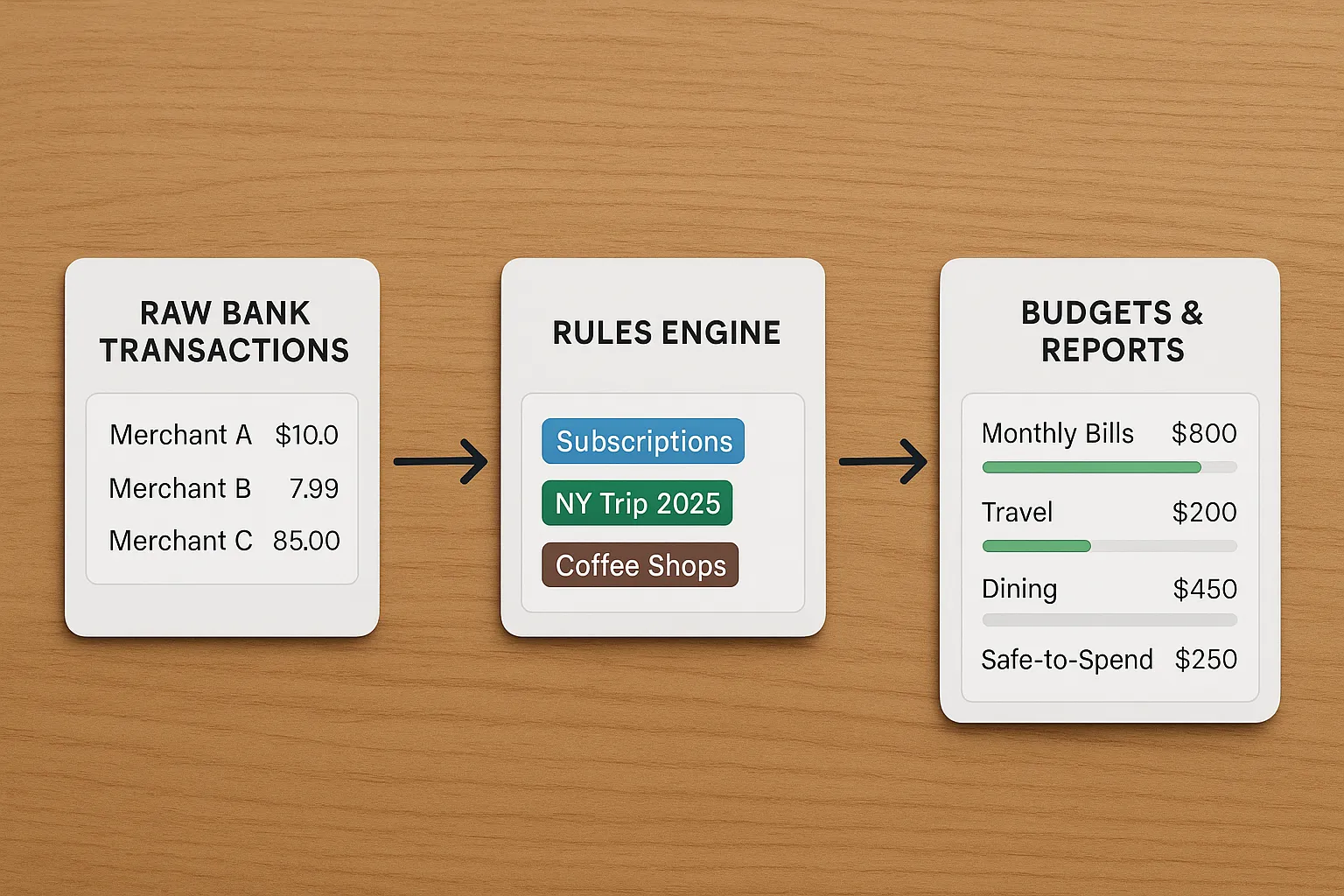
Set once, forget forever. FIYR’s automatic transaction rules categorize based on merchant names and descriptions, and apply labels and notes so your feed stays clean.
- If description contains “Spotify,” categorize to Online Services, add label “Subscriptions.”
- If payee contains “Shell,” categorize to Gas.
- If description contains “AMZN” and “Prime,” categorize to Online Services, add label “Amazon,” not Entertainment.
- If payee contains your bank name and description contains “Payment,” categorize to Credit Card Payment so it never hits your spending totals.
Rules turn your most common mistakes into non-issues. The more you automate, the fewer cleanups you need.
Labels for cross-cutting views
Labels in FIYR act like smart tags across categories. Use them to see the full cost of anything that spans multiple categories.
- “New York Trip 2025,” flights, hotel, Ubers, and a bagel tour, all labeled and roll-up in one tap.
- “Tax Deductible,” mark business-related items even if categories differ.
- “Reimbursable,” tag work expenses so you can confirm repayment and keep them out of your real spend analysis.
Labels give you projects without wrecking your category structure.
Edit, merge, delete, and create custom categories
Your money, your map. In FIYR you can, rename a category, for example change “Coffee & Tea” to “Cafes” if that clicks. Delete or merge categories, when you delete “Flowers,” roll its history into “Gifts.” Create custom categories, “Streaming” under Utilities or “Side Hustle Gear” under Business Expenses. Reorder categories so your favorites sit at the top. Categories always stay anchored to a group, which preserves clean roll-ups in reports and budgets.
Auto-cleanups that protect your numbers
- Transfers detection, payments between your accounts get flagged to Transfer or Incoming Transfer & Deposits, not spending and not income.
- Credit card payments, automatically categorized to Credit Card Payment under Finance & Loans. Zero impact on spending totals.
- Refunds and returns, categorize back to the original category so they offset spending instead of showing up as income.
- Subscriptions view, with Online Services plus labels, recurring charges stop hiding in random categories.
Bottom line, FIYR keeps budgets honest by keeping nonsense out of your totals.
Three real-world transactions, here is how FIYR keeps them clean
1) “AMZN MKTP US*2J4H” 96.43 dollars, without rules, this lands in Miscellaneous. With FIYR, your rule catches “AMZN,” sets category to Gifts when the order was a birthday present, and adds label “Amazon.” Your Shopping & Entertainment group increases correctly, your Subscriptions and Groceries stay untouched.
2) “CHASE CREDIT CRD AUTOPAY” 1,200 dollars, counted as spending, your budget explodes. In FIYR, this is Credit Card Payment under Finance & Loans. It never touches your Food, Housing, or Transportation. Your savings rate and safe-to-spend remain real.
3) “Venmo Payment to Mike” 120 dollars, is it dinner, rent share, or a transfer to yourself, without context, it hits Eating Out. In FIYR, a rule for “Venmo” routes it to Transfer by default, you can add a one-off label if it was truly a shared bill. No more phantom eating out.
The error-proof categorization playbook, a 10-minute weekly routine
Use this simple cadence and watch your budget grow teeth.
- Inbox zero your Uncategorized, open FIYR and clear the Uncategorized list. If a merchant is recurring, add a rule on the spot.
- Sweep transfers and payments, confirm all bank-to-bank and credit card payments are in Transfer or Credit Card Payment.
- Tag your subscriptions, label recurring charges “Subscriptions,” consider a micro-budget cap for the month.
- Scan Amazon and big-box merchants, use labels like “School,” “Housewares,” or “Gifts” to track projects without breaking categories.
- Close the loop on refunds and reimbursements, assign them back to the original category and label “Reimbursable” if needed.
Do this weekly, that way month-end reports become a victory lap, not a forensic audit.
Why clean categories matter for FIRE
- Accurate savings rate, no fake income from refunds, no double counting from payments.
- Better budgets, group budgets let you say, Food & Drink under 900 dollars, even while drilling into Eating Out vs Groceries if you want.
- Truer FIRE projections, your spending trend lines in FIYR feed your FIRE date calculator with actual life costs, not messy guesses.
For a deeper dive into why savings rate rules everything, read Boost Your Savings Rate, then take that clarity into your monthly plan.
Common mistakes vs FIYR fixes, quick table
| Mistake | How it distorts | FIYR fix |
|---|---|---|
| P2P treated as spend | Phantom expenses | Rule routes Venmo to Transfer |
| Credit card payment as spend | Double counting | Auto-categorized to Credit Card Payment |
| Refunds logged as income | Fake savings bump | Categorize back to original category |
| Amazon bucket | No insight by type | Rules plus labels like “Amazon,” “Gifts,” “Housewares” |
| Subscriptions scattered | Poor visibility of burn rate | Online Services category plus “Subscriptions” label and a budget cap |
| Business mixed with personal | Messy taxes and budgets | Separate Business Expenses group and labels like “Tax Deductible” |
| “Miscellaneous” sprawl | Unactionable reports | Aggressively rename, merge, and delete, add rules to prevent recurrence |
Default categories, ready to customize
FIYR ships with a thoughtful set of categories across all the major groups you actually use, Food & Drink, Home, Personal Care & Wellness, Utilities, Shopping & Entertainment, Charitable Giving, Family & Pets, Transportation & Auto, Finance & Loans, Housing, Travel & Leisure, Business Expenses, Transfers & Adjustments, and Income. You can rename, delete, or create custom categories at any time, and they always sit inside a group so your roll-ups stay clean.
Highlights you will likely use on day one, Eating Out, Groceries, Coffee & Tea, Rent or Mortgage, Electric, Internet, Gas, Auto Maintenance, Insurance, Taxes, Clothing, Entertainment, Gifts, Hotels & Lodging, Flights, Charity, Pets, Student Loans, Investments, Payroll Income, and yes, the important non-spend items like Transfer and Credit Card Payment to keep your totals honest.
Frequently asked questions
What if my bank descriptions are weird and cryptic? Create a rule based on any stable part of the description, for example “CHK PYMNT” or the merchant’s unique code. Once a rule works, future transactions auto-clean. Should I use labels or more categories? Use categories for types of spending and labels for projects or attributes. “Groceries” is a category, “NY Trip 2025” is a label across Flights, Eating Out, and Hotels. Can I merge categories without losing history? Yes. Delete or merge a category and roll its history into your chosen category so past reports stay continuous. How do I keep subscriptions from creeping up? Categorize them to Online Services, add the “Subscriptions” label, and set a monthly budget cap. Review the labeled list monthly and cut one. How do I keep credit card payments out of spending? FIYR auto-categorizes them to Credit Card Payment under Finance & Loans. They do not count toward your spending totals. What about cash and ATM withdrawals? Use the Cash & ATM category, then either label the cash for tracking or manually recategorize cash purchases when you log them. Rules help minimize the manual work. I am self-employed, how do I split business and personal? Use the Business Expenses group for anything deductible and add labels like “Tax Deductible” or client names. Keep a strict line, your future self in April will thank you.The takeaway
Budgets do not fail because you are lazy, they fail because your categories are lying. FIYR makes error-proof categorization the default with rules, labels, editable categories, and auto-cleanups so your budget, savings rate, and FIRE timeline stop guessing and start telling the truth.
Oh, and yes, all of this plugs straight into FIYR’s safe-to-spend, subscription tracking, net worth, and FIRE date calculator, so the cleaner your categories, the faster you move. If you are ready to see what your money is actually doing, open FIYR, set three rules, kill Uncategorized, and watch clarity turn into progress.
Reference, CNBC’s paycheck-to-paycheck data. For more on building resilience while you clean things up, see Building Your Emergency Fund and Boost Your Savings Rate on the FIYR blog.