Best AI Tools for Budgeting: What’s Worth Using in 2026
Your budget isn’t failing because you’re “bad with money.” It’s failing because your money moves at the speed of a swipe, and your brain still thinks it’s hunting mammoths.
Meanwhile, 60% of Americans are still living paycheck to paycheck and 3 in 5 carry credit card debt. That’s not a character flaw, it’s a system problem with a higher APR than your first credit card. (CNBC)
So yes, in 2026, you should absolutely use AI for budgeting.
Just don’t expect it to save you if your financial life is a flaming pile of “miscellaneous.” AI can’t fix what you refuse to look at. But it can make looking a lot less painful.
What “AI budgeting” actually means in 2026 (and what it doesn’t)
Most people hear “AI tools for budgeting” and picture a robot gently whispering, “Stop DoorDashing, king.” Reality is less sci-fi, more useful.
In practice, the best AI tools for budgeting do three jobs:
- Catch: pull in transactions automatically and spot recurring charges
- Classify: categorize and clean messy merchant names (and learn your patterns)
- Coach: turn your raw data into prompts, projections, alerts, and “here’s what to do next”
What AI does not do (yet):
- Magically fix overspending without you changing anything
- Know your intent (was that Target run diapers or dopamine?) without a system
- Replace a clean category structure and a weekly review rhythm
AI is a power tool. Give it a blueprint, it builds a house. Give it chaos, it builds you… more chaos, but faster.
The 2026 litmus test: how to tell if an AI budgeting tool is worth using
Meet Jordan.
Jordan is a former Mint user, now wandering the personal finance desert with 14 half-trials and a bank login PTSD twitch.
Jordan’s first week with an “AI budgeting app” looks amazing. Charts! Colors! A chatbot! The works.
Then reality hits:
- Groceries are labeled “Shopping”
- Transfers are counted as spending (classic)
- Subscriptions are “mostly” detected (aka, the sneaky ones survive)
- The chatbot confidently recommends a savings rate based on incorrect data
Jordan didn’t need more AI. Jordan needed truth.
Here’s the scorecard that actually matters:
| What to test | Why it matters | Quick pass/fail check |
|---|---|---|
| Categorization accuracy | Garbage data creates garbage decisions | Can you fix categories quickly and make the fix stick? |
| User control | AI guesses, you live with consequences | Can you create custom categories, rules, and labels? |
| Explainability | “Because AI said so” is not a budget | Does it show why something was categorized or flagged? |
| Subscription visibility | Recurring charges are silent budget killers | Can you see recurring charges in one place and track changes over time? |
| Net worth + liabilities | Budgeting without net worth is dieting without a scale | Can it track assets and debts cleanly (without double-counting)? |
| Goal math | Budgets need a “why” attached | Does it connect spending to goals (safe-to-spend, savings rate, FIRE date)? |
| Data portability | Your data is leverage | Can you export (CSV) and avoid vendor lock-in? |
| Privacy posture | If it’s free, you might be the product | Are permissions, sharing, and exports transparent? |
Memorable rule: If the tool won’t let you correct reality, it’s not “AI,” it’s astrology with a login screen.
Best AI tools for budgeting in 2026 (the ones that actually earn a spot)
This list is intentionally opinionated. Plenty of apps can do “budgeting.” Fewer can do budgeting plus decision-making without turning your month into an admin job.
1) FIYR (best for people who want control, clarity, and FIRE math)
FIYR is built for the moment after you stop pretending and start tracking.
Where FIYR wins is not “AI magic,” it’s automation plus customization, the combo that makes AI-style insights possible without hallucinations.
What it’s great at:
- Full spending and money tracking with customizable categories and groups
- Automatic transaction rules so your system improves over time
- Subscription tracking so recurring charges stop hiding in plain sight
- Net worth tracking (assets and liabilities) to keep the big picture honest
- Savings rate + FIRE date calculation based on your real data, not vibes
- Goal tracking + safe-to-spend so you know what’s actually available
If you are a former Mint user who wants a modern replacement, or a FIRE person who cares about savings rate and timelines, FIYR is the “useful grown-up” choice.
If you want the deeper framework behind AI-first budgeting, pair this with FIYR’s breakdown of AI budgeting apps in 2026.
Quotable takeaway: The best “AI” is a system that gets smarter because you set rules once, not because it guessed louder.
2) Monarch Money (best for households who want a shared financial cockpit)
Monarch is strong when the real problem is not math, it’s coordination.
If you are managing a household, multiple accounts, and joint decisions, Monarch tends to shine with collaboration and broad visibility.
Watch-out: you still need a clean category setup and rules discipline, otherwise “AI insights” become “AI noise.”
3) Copilot Money (best for design lovers, especially iPhone-first users)
Copilot has a reputation for a slick experience and useful transaction organization. If you are the kind of person who will budget more because the app doesn’t feel like filing taxes, that matters.
The trade-off is the same as always: great UI doesn’t replace a budgeting system. It just makes the system easier to use.
4) Rocket Money (best for subscription-heavy people who want help cutting recurring bills)
If your budget leaks mostly through recurring charges, Rocket Money can be a strong add-on, especially for subscription visibility and cancellation workflows.
This is the tool for the person who finds a $9.99 charge and says, “What is this?” and the charge replies, “I’ve lived here for three years.”
Pairing move: use a subscription-focused tool to clean up recurring charges, then track the ongoing impact inside a full money system.
5) Quicken Simplifi (best for people who want structure, not vibes)
Simplifi is a solid pick if you want a more traditional personal finance tool with modern conveniences.
It’s not trying to be your therapist. It’s trying to be your ledger, in a good way.
If your priority is a clean “spending plan” and straightforward reporting, this category of tool can be a good fit.
6) YNAB (best for behavior change and zero-based budgeting diehards)
YNAB is not “AI-first,” it’s habit-first.
If you need a tool that forces you to assign dollars a job and confront trade-offs in real time, YNAB’s method is still a heavyweight.
Best use in 2026: combine YNAB’s discipline with an AI assistant (see below) to generate rules, category cleanups, and weekly review scripts.
7) Tiller (best for spreadsheet power users who still want automation)
Tiller is for the “I trust spreadsheets more than apps” crowd.
It can be excellent if:
- You want full control and custom reporting
- You like building your own views
- You want an export-first setup
In 2026, the AI angle is pairing Tiller with an assistant that can analyze exports and help you build categories, find anomalies, and write guardrails.
8) ChatGPT or Claude (best as the “budgeting co-pilot,” not the budget itself)
This is the spicy take: the most useful “AI budgeting tool” might be a general AI assistant, if you use it correctly.
Not to replace your tracker, but to:
- Turn messy spending into a plan
- Generate a category structure that matches your life
- Write negotiation scripts, cancellation scripts, and “money meeting” agendas
- Summarize your month from exported transactions
Here are prompts that actually work (copy, paste, improve):
- “I spend $X/month on fixed bills, $Y on variable, $Z on debt. Build a 3-bucket budget with weekly spending targets and two guardrails.”
- “Create a set of category rules to split Amazon into Needs vs Wants using labels and a ‘Needs Review’ bucket.”
- “Given these 20 anonymized transactions, propose transaction rules and tell me what to watch weekly.”
Quotable takeaway: AI is great at advice. It’s terrible at accountability. That part is still you.
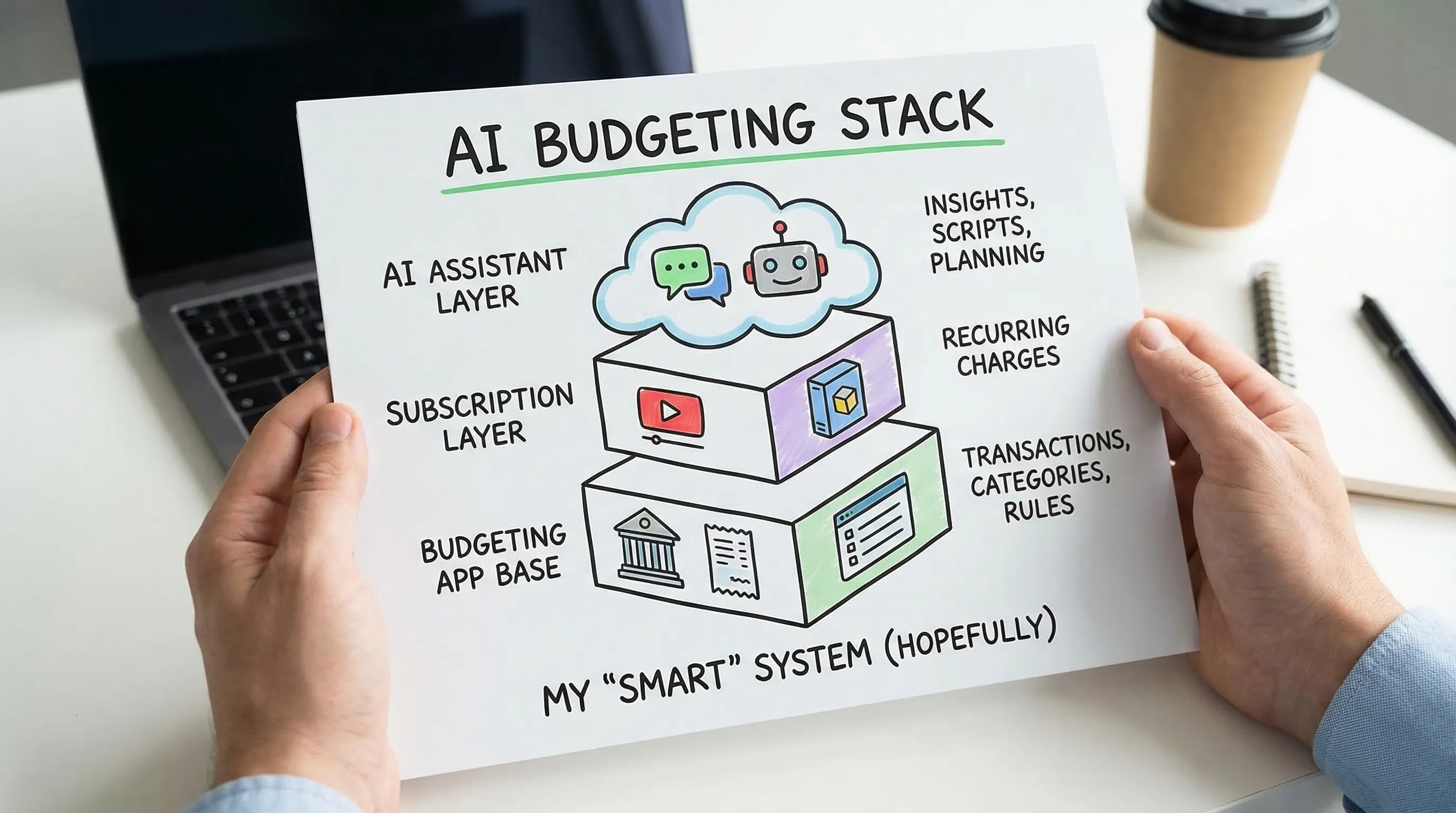
The best AI budgeting “stacks” (because one tool rarely does everything)
Most people don’t need more apps. They need fewer apps that do specific jobs well.
Here are simple stacks that work in real life.
Stack A: “Mint refugee who wants truth fast”
Use a modern money tracker with strong categorization control and automation rules, then add AI only for planning and scripts.
A clean option is FIYR + a general AI assistant (for category cleanup prompts and weekly review checklists).
If you want a switching playbook, start with Best Mint Alternative 2026: The Tools Worth Switching To.
Stack B: “Subscription exorcism”
If recurring charges are your main leak, you want a subscription-first tool plus a tracker that keeps the gains.
Use a subscription-focused workflow, then track ongoing spend with budgets, rules, and category caps.
Related: FIYR’s subscription cleanup plan.
Stack C: “FIRE chaser with a deadline and zero patience”
You want three numbers on speed dial:
- savings rate
- net worth
- projected FIRE date
Use a tool that connects spending to those metrics, otherwise you are just coloring charts.
FIYR is built for this flavor of intensity, especially if you run rules, labels, and a weekly rhythm.
Memorable line: If your budget doesn’t change your timeline, it’s just journaling with extra steps.
How to test any AI budgeting tool in 45 minutes (the “no honeymoon” method)
AI tools are charming for the first week. Then they start asking for commitment. Flip the script.
Do this instead: test for reality on day one.
Step 1: Import and inspect 30 days of transactions
You’re looking for:
- miscategorized big merchants (Amazon, Costco, Target)
- transfers counted as spending
- duplicates
- missing accounts
If the data is wrong, the insights are fan fiction.
Step 2: Create 8 to 12 categories that reflect decisions
Not “Coffee.” Not “Shopping.” Decisions.
Examples:
- Groceries
- Eating Out
- Convenience Food (this one hurts, which means it works)
- Transportation
- Household Essentials
- Subscriptions
- Travel
- Savings and Investing
Need help building categories that stay clean? Start with Budgeting Categories List: A Clean Setup That Works.
Step 3: Add 5 transaction rules (the minimum viable automation)
Rules are how you stop re-fighting the same battle.
Examples:
- “STARBUCKS” goes to Eating Out
- “NETFLIX” goes to Subscriptions
- “UBER” goes to Transportation
- “AMZN” goes to Needs Review (until you label it)
- Credit card payments are treated as transfers (to avoid double counting)
If you want the full philosophy, FIYR’s guide on spending rules automation is the grown-up version of “set it and forget it.”
Step 4: Run the “AI truth check”
Ask the tool (or its AI layer):
- “What are my top 3 overspend categories versus last month?”
- “What subscriptions increased in the last 90 days?”
- “What is my savings rate trend and what changed it?”
Then verify manually with the underlying transactions.
If it can’t show its work, don’t trust its conclusions.

The uncomfortable truth: AI doesn’t beat spending, systems do
AI can help you:
- see leaks sooner
- categorize faster
- create better defaults
- connect spending to goals
But the win condition is still the same in 2026 as it was in 2006:
- Clean data (categories, rules, no double counting)
- A rhythm (weekly check-in, monthly close)
- Guardrails (caps, safe-to-spend, subscription limits)
- A goal that bites (debt-free date, emergency fund runway, FIRE date)
If you want one simple move that makes every “AI budgeting” feature smarter, it’s this:
Build a system where your tracker gets more accurate every week.
That’s why tools like FIYR, with customizable categories, automation rules, subscriptions, net worth, savings rate, and FIRE projections, tend to feel less like “budgeting” and more like financial control.
Final line to steal: AI is the intern. You’re the CFO. Act like it.