 FIYR
FIYR AI Budgeting Apps in 2026: Key Features, Benefits, and Use Cases
If you’re looking for an ai budgeting app in 2026, you’re not lazy. You’re just alive.
Money has gotten weird: subscriptions multiply like gremlins, inflation still lives rent-free in everyone’s brain, and your “small treat” habit has a better growth curve than your 401(k).
Meanwhile, the stakes are not cute. A CNBC report citing a 2023 LendingClub survey found around 60% of Americans were living paycheck to paycheck and many reported significant financial stress, weak emergency savings, and persistent credit card debt. That’s not “oops.” That’s “one car repair away from chaos.” (CNBC coverage)
So yes, people want budgeting software that doesn’t just record reality, it helps prevent reality.
That’s the promise of AI budgeting apps in 2026: fewer spreadsheets, fewer “why is this in Restaurants?” moments, more autopilot, more clarity.
What “AI budgeting” actually means in 2026
AI budgeting isn’t a robot that pays your bills while whispering affirmations.
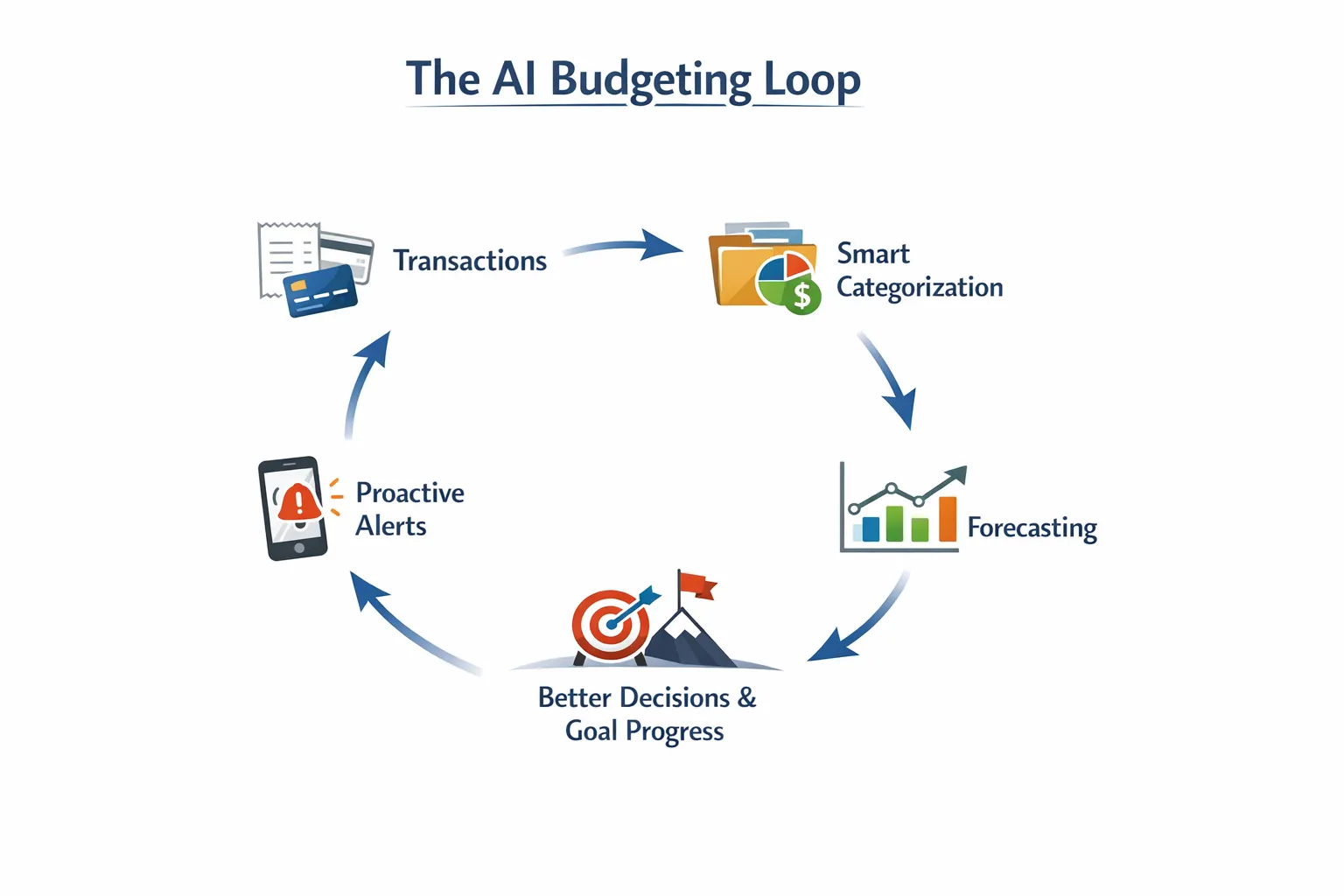
In practice, “AI” in budgeting usually means some combo of:
- Smarter categorization: learning where transactions belong based on your corrections.
- Predictions and forecasts: projecting your end-of-month cash position from your patterns.
- Proactive alerts: flagging overspending, unusual charges, upcoming bills, or category drift.
- Goal guidance: suggesting what’s safe to spend if you’re trying to save, pay debt, or hit FI.
- Natural language help (in some apps): “Can I spend $200 this weekend?” and it answers like a calm adult.
Here’s the part nobody talks about: AI is only as good as your underlying data hygiene. If your transactions are messy (merchant names, transfers, reimbursements, split transactions), AI can become confidently wrong, which is the most expensive kind of wrong.
Quotable truth: AI doesn’t fix your finances, it fixes your friction.
AI budgeting apps vs “normal” budgeting apps
A traditional budgeting app is basically a mirror. It shows you what happened.
An AI-driven budgeting app tries to be a slightly judgmental coach. It shows you what happened and what’s likely to happen next, then taps you on the shoulder before you faceplant.
| Capability | Traditional budgeting apps | AI budgeting apps (2026 style) | What this changes in real life |
|---|---|---|---|
| Categorization | Rules + manual cleanup | Pattern learning + suggested fixes | Less time tagging, fewer “misc” black holes |
| Forecasting | Basic month totals | Predictive cash flow and category trajectories | Fewer surprise end-of-month shortfalls |
| Alerts | Static notifications | Behavior-based anomaly and overspend alerts | Catch problems earlier (subscriptions, fraud-ish activity, drift) |
| Goals | Simple target tracking | Adaptive guidance (safe-to-spend, probability-to-goal) | Goals feel like a system, not a wish |
| Explainability | Usually clear | Sometimes opaque (“the model decided…”) | You trade transparency for convenience |
The tradeoff is simple: traditional apps are predictable, AI apps are proactive.
And then things get interesting: the best apps in 2026 combine both. AI for speed, rules/customization for control.
Key AI features to look for (and what they actually do)
“AI-powered” is marketing glitter. You want the features that produce boring, repeatable wins.
1) AI categorization that learns from your corrections
Meet Sarah. Sarah buys one thing on Amazon and suddenly her app thinks Amazon equals Groceries.
Classic.
Good AI categorization does three things:
- Learns your personal patterns (not just global merchant assumptions).
- Handles messy merchants (Stripe, Square, PayPal, Apple, “AMZN MKTP” roulette).
- Lets you override cleanly with rules, custom categories, and easy bulk edits.
What to test before you commit:
- Import 60 to 90 days of transactions.
- Correct 20 miscategorized transactions.
- See if the app stops making the same mistakes.
If it keeps repeating the same errors, it’s not “AI,” it’s just vibes.
2) Predictions that work like weather forecasts (not fortune-telling)
Budget forecasts in 2026 should answer questions like:
- “If I keep spending like this, where do I land by the 30th?”
- “What’s my likely grocery spend this month?”
- “Do I have enough cash runway until next paycheck?”
The best forecasting features:
- Separate recurring bills from discretionary spending
- Account for seasonality (holidays, annual renewals)
- Let you simulate “what if” scenarios (income drop, travel month, surprise medical bill)
A forecast is not a prophecy. It’s a flashlight.
One-liner to keep: Prediction isn’t control, it’s early warning.
3) Alerts that prevent “quiet” financial disasters
Most financial problems don’t show up like a horror movie jump scare.
They show up like:
- a subscription renewal you forgot
- a category slowly creeping up
- a bill that hits two days before payday
- a “small” interest charge that becomes a lifestyle
AI alerts should go beyond “your balance is low.” That’s not an alert, that’s a eulogy.
Look for alerts that flag:
- unusual charges
- duplicate transactions
- new subscriptions or recurring charges
- category overspend trajectory (not just after you blow the budget)
4) Goal intelligence (the adult supervision layer)
Old-school apps treat goals like a sticker chart.
AI-style goal systems in 2026 should behave more like:
- “Here’s your target.”
- “Here’s your current pace.”
- “Here’s what changes if you keep doing that.”
- “Here’s what’s safe to spend this week without sabotaging the plan.”
This matters for FIRE people because the math is unforgiving.
- Savings rate drives timeline.
- Spending drives both your FI number and how fast you reach it.
Translation: your budget is not just a budget. It’s a retirement date.
5) “Explain your money to me like I’m busy” reporting
The killer feature isn’t charts. Everyone has charts.
The killer feature is clarity with context:
- “Your spending rose 12% month over month, mostly from dining and travel.”
- “Your subscriptions are up and you added two new recurring charges.”
- “Your net worth increased, but your cash runway decreased.”
If an app can’t explain the why, it’s just financial karaoke.
Benefits of AI budgeting apps (who actually wins)
AI budgeting apps tend to create wins in three buckets:
Time savings
If you’ve ever spent your Sunday night categorizing transactions while questioning every life choice, you understand the value proposition.
AI reduces:
- manual categorization
- repetitive cleanup
- time-to-insight (finding the “what changed?”)
Better decisions through earlier feedback
Humans are not great at delayed consequences.
We are amazing at:
- “It’s fine, I’ll fix it next month.”
- “This doesn’t count, it’s a birthday.”
- “Technically this is self-care.”
AI alerts and forecasts compress the feedback loop so you see the problem while it’s still fixable.
More consistent progress on goals
A good goal system turns “saving” from a mood into a machine.
Quotable: Motivation is unreliable. Systems are petty and consistent.
5 realistic use cases for AI budgeting apps in 2026
These are the situations where AI features move from “nice” to “how did I live without this?”
Use case 1: The ex-Mint user who wants autopilot, not homework
Mint is gone. Your muscle memory still reaches for it.
You want:
- auto-categorization that doesn’t turn Amazon into a personality test
- a clean spending tracker
- subscription visibility
- budgets that match how you actually live (not how you cosplay as a perfect person)
AI helps by:
- learning categories faster
- spotting recurring charges you forgot existed
- warning you when you’re drifting before you hit “why is my card declined?”
Reality check: even the best AI needs a short “training phase.” You correct a few transactions, it gets smarter, you get your evenings back.
Use case 2: The freelancer with irregular income (a.k.a. cash flow parkour)
Your income is not monthly. It’s interpretive dance.
In this world, forecasting matters more than budgeting.
AI helps by:
- predicting runway based on bill schedules and recent spending
- identifying your “baseline burn” (the number you must cover every month)
- creating alerts when spending is fine in a good month but dangerous in a drought month
If your app can’t handle irregular income cleanly, it’s not a budgeting tool, it’s a guilt machine.
Use case 3: The subscription-heavy household that keeps donating to corporations
A lot of people don’t have a budgeting problem. They have a recurring charge problem.
The classic scenario:
- You sign up for a free trial.
- You forget.
- The subscription renews.
- You notice 9 months later.
- You tell yourself you’ll cancel.
- You do not cancel.
AI helps by:
- detecting new recurring charges quickly
- alerting you before renewals
- grouping subscription spend so it’s impossible to ignore
One-liner: Subscriptions are just rent payments for apps you barely like.
Use case 4: The couple trying to stop money fights (without running a weekly tribunal)
Couples don’t fight about math. They fight about expectations.
AI-style insights help couples because they reduce ambiguity:
- “We’re trending over on dining by $180.”
- “Groceries are stable, but random Target runs are eating the surplus.”
- “We can spend $X this weekend and still hit the savings goal.”
Less “you always spend,” more “the data says this category is drifting.”
Money peace is not romance. It’s receipts plus shared rules.
Use case 5: The FIRE tracker who wants a plan, not a vibe
FIRE people don’t just track spending for fun. They track it because time is the prize.
AI helps by:
- estimating future savings rate based on current patterns
- projecting whether you’re on pace for a target FI date
- flagging lifestyle creep early (when it’s still reversible)
When your app makes it easy to track net worth, savings rate, and goals in one place, FIRE stops being “someday” and becomes “on schedule.”
A practical checklist: how to pick the right AI budgeting app in 2026
Before you pay for anything, run this like a pre-flight checklist.
Data accuracy and control
You want AI, but you also want a steering wheel.
Look for:
- easy recategorization and bulk edits
- custom categories and category groups
- rules (so you can lock in decisions the AI keeps getting wrong)
- clean handling of transfers, refunds, reimbursements
Forecasting that matches your life
Ask:
- Does it handle irregular income?
- Can it separate bills vs discretionary spending?
- Does it give a meaningful “safe-to-spend” style number, or just pretty charts?
Alerts that are useful, not noisy
If an app alerts you 12 times a day, you’ll do what humans do best: ignore it.
You want alerts for:
- unusual charges
- overspend trend (before it’s too late)
- new recurring charges
Goals that feel actionable
A goal should change behavior, not just decorate the dashboard.
Good goal features include:
- progress pace (on track, behind, ahead)
- tradeoff clarity (if you do X, goal moves to Y date)
Privacy and trust basics
This is your money. Not a personality quiz.
Do the boring checks:
- read the privacy policy
- understand what data is shared (and with whom)
- confirm you can export your data
One-liner: If you can’t leave with your data, you’re not a customer, you’re inventory.
The setup that makes AI actually work (a 45-minute “make it stick” sprint)
AI budgeting apps perform best when you give them structure. Not perfection, structure.
Here’s a simple setup that works whether you’re using heavy AI features or more rules-based automation.
| Step | What you do | Why it matters |
|---|---|---|
| Clean categories | Merge duplicates, rename confusing buckets, create categories you actually use | AI learns faster when categories are consistent |
| Fix transfers | Mark credit card payments and account transfers correctly | Prevents fake “spending” and broken budgets |
| Set 3 to 5 category caps | Pick the categories you overspend in (dining, shopping, subscriptions) | Constraints beat willpower |
| Add one money goal | Emergency fund, debt payoff, or investing target | A budget without a goal is just accounting |
| Turn on subscription tracking | Identify recurring charges and renewal timing | Subscription creep is silent spending |
| Weekly 10-minute review | Approve categories, scan alerts, adjust one cap | Small fixes prevent big messes |
The secret isn’t AI. It’s cadence.
Quotable: You don’t need a perfect budget. You need a budget you actually look at.

Run an “AI truth check” before you trust the insights
Once your setup is in place, ask the app (or its AI layer) three questions:
- “What are my top 3 overspend categories versus last month?”
- “Which subscriptions increased in the last 90 days?”
- “What is my savings rate trend, and what changed it?”
Then verify each answer against the underlying transactions. If the tool can’t show its work, don’t trust its conclusions. Confidently wrong advice built on miscategorized transfers is worse than no advice.
A general AI assistant as your budgeting co-pilot
The most useful “AI budgeting tool” might be a general assistant like ChatGPT or Claude, used next to your tracker rather than instead of it. It’s good at turning messy spending into a plan, proposing a category structure that matches your life, writing cancellation or negotiation scripts, and summarizing a month from exported data.
Privacy note: don’t paste raw bank data with account numbers or personally identifying details into any AI tool. Anonymize merchants and amounts, or work from category totals.
Prompts that work (copy, paste, improve):
- “I spend $X/month on fixed bills, $Y on variable spending and $Z on debt. Build a 3-bucket budget with weekly spending targets and two guardrails.”
- “Create category rules that split Amazon into Needs vs Wants, with a Needs Review bucket for anything unclear.”
- “Given these 20 anonymized transactions, propose transaction rules and tell me what to watch weekly.”
AI is great at advice and terrible at accountability. The weekly review is still yours.
Where FIYR fits (especially if you want flexibility plus FIRE focus)
A lot of “AI budgeting” hype is really a demand for two things:
1) Less manual work
2) Better decisions
Some apps try to solve that primarily with AI.
FIYR solves it with something surprisingly powerful: clean data, deep customization, and automation that you control, plus FIRE-focused metrics.
If you want a modern alternative to Mint, Monarch Money, Copilot, Rocket Money, or Quicken, FIYR is built around the fundamentals that make any smart system work:
- spending and income tracking
- flexible budgeting (including dynamic budgets)
- customizable categories and category groups
- automatic transaction rules
- subscription tracking
- net worth tracking (assets and liabilities)
- savings rate tracking
- goal tracking with a safe-to-spend style balance
- a FIRE date calculator based on your real numbers
If you like the idea of AI insights but hate the idea of an opaque black box, pairing “smart automation” with rules and customization is often the sweet spot.
If you want to go deeper on the rules side of automation (the unsexy workhorse that keeps categories clean), this guide is worth bookmarking: Automated Budgeting: How Rules Save Time and Keep Your Spending Accurate.
And if you’re coming from Mint and want a clean comparison of budgeting styles in 2026, start here: FIYR vs Mint.
One-liner: The best “AI” is the kind that stops you from thinking about budgeting at all.
The bottom line
AI budgeting apps in 2026 can be legitimately useful, especially for:
- categorization that learns
- forecasts that prevent end-of-month surprises
- alerts that catch subscription creep and spending drift
- goals that translate plans into “here’s what you can do today”
But don’t outsource your financial life to a buzzword.
Use AI for speed. Use rules and review rhythm for accuracy. Use goals for direction.
And remember: your budget doesn’t need to be perfect.
It needs to be honest.
Because the only thing worse than overspending is overspending while your app tells you everything is “fine.”