 FIYR
FIYR Understanding Plaid Sync Issues: Fixes, Workarounds, Reality
Your budget is only as smart as the dumbest link in the chain.
And when that link is a flaky bank connection, it does not matter how disciplined you are. You can be the kind of person who meal-preps quinoa and reads the S&P 500 prospectus for fun. If your transactions don’t show up, you’re budgeting in the dark.
Meet Alex. Former Mint user. Now on their “new year, new system” arc. They open their finance app, see their checking balance looks fine, but the last transaction imported is… three days old. Meanwhile, Alex definitely bought groceries, paid for parking, and rage-ordered takeout.
So Alex does what any modern adult does when confronted with uncertainty: panic-scroll Reddit, re-enter their password 14 times, and whisper, “Is Plaid down?” like it’s an ancient prayer.
Here’s the uncomfortable truth: Plaid sync issues are normal, fixable (often), and sometimes completely out of your control. The win is knowing which is which, and what to do next.
Why Plaid sync issues feel personal (but aren’t)
Money stress is already a national sport. CNBC reported that 60% of Americans were living paycheck to paycheck (and it’s not just “low income” households) plus 70% are stressed about finances, only 45% have an emergency fund, and 61% carry credit card debt (CNBC).
In that environment, a broken bank sync is not a minor inconvenience. It’s the financial equivalent of your smoke alarm chirping at 2:00 a.m.
When your data is late, your decisions get sloppy. And sloppy decisions are expensive.What Plaid actually does (and where things break)
Plaid is a financial data network. Many personal finance apps use it (or other aggregators) to connect to your bank and pull in transactions, balances, and account details.
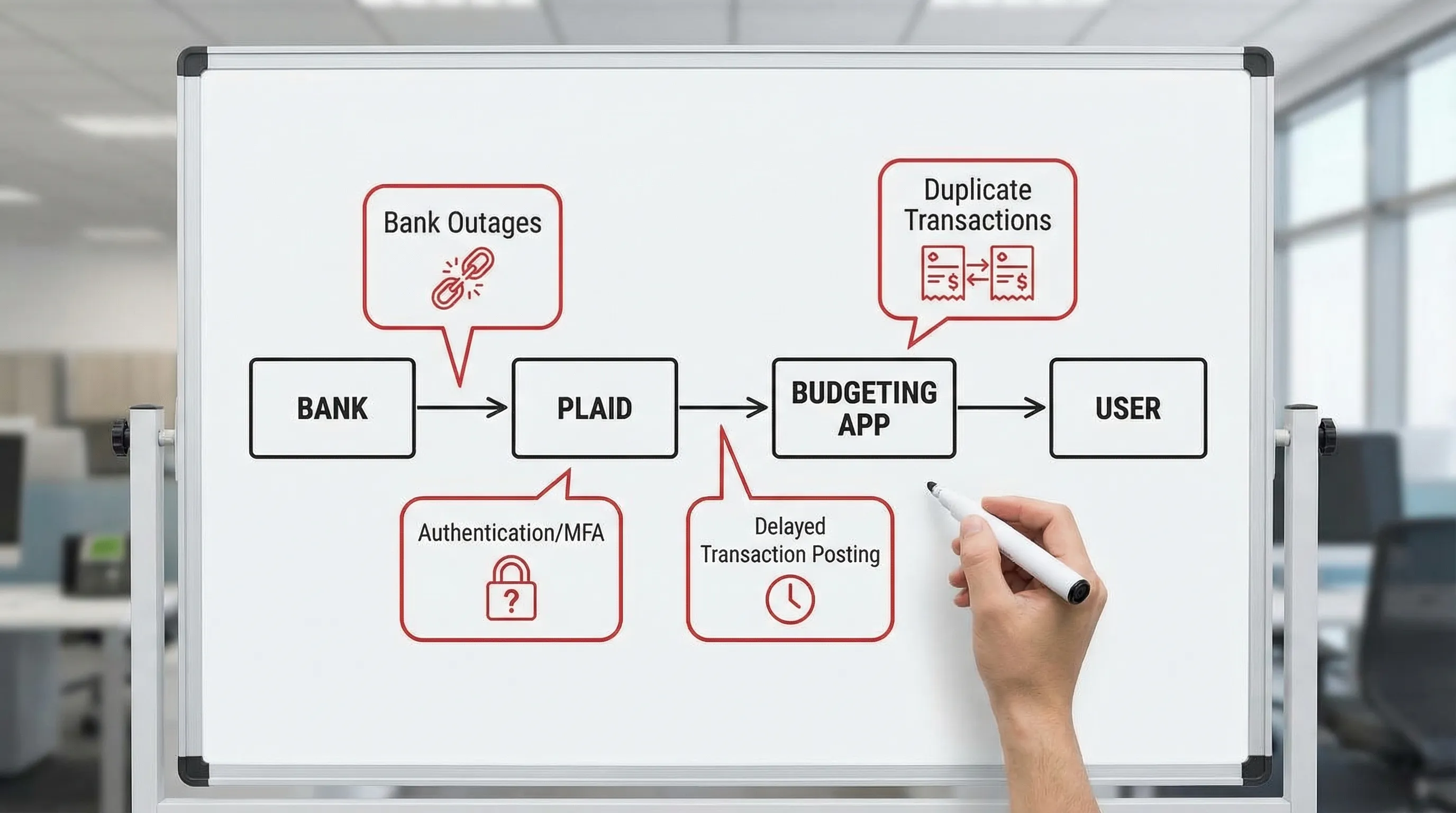
The pipeline looks like this:
- Your bank holds your account data.
- Plaid acts as the translator and delivery service.
- Your finance app receives the data and turns it into categories, budgets, net worth, and reports.
If syncing fails, it usually breaks in one of three places:
- Bank-side issues (outages, security changes, blocking aggregators, MFA weirdness)
- Aggregator-side issues (Plaid incident, institution integration hiccup)
- App-side display rules (filters, duplicate handling, pending vs posted behavior)
The key mindset shift: A sync problem is rarely “your fault,” but it is your problem.
The “symptom translator”: what you see vs what’s happening
Most people waste time trying random fixes because they’re treating symptoms like causes. Use this cheat sheet instead.
| What you’re seeing | Most likely cause | What it usually means | Best first move |
|---|---|---|---|
| “Connection error” / “Needs attention” | Authentication expired, MFA required, password changed | Plaid can’t prove it’s you anymore | Re-authenticate (relink) the account |
| Transactions missing for 1 to 3 days | Bank posting delay, weekend/holiday lag, pending not imported | Your bank hasn’t finalized transactions yet | Wait 24 hours, then force refresh |
| Balance looks wrong but transactions look right | Available vs current balance mismatch, bank reporting oddities | Your bank is showing holds/pending differently | Compare “available” vs “current” in your bank |
| Duplicate transactions | Bank reissued IDs, pending became posted, connection re-linked | Same purchase shown twice | Look for one pending + one posted, dedupe if needed |
| Only one account at the bank won’t sync | Account type restrictions, permissions | Bank is sharing some accounts, not all | Reconnect, then check if that account is supported |
| Sync works… then breaks every few days | MFA policy, security step-up, institution throttling | You’re in a recurring re-auth loop | Use OAuth if available, avoid frequent password resets |
One-liner to remember: Most “missing data” is just “late data wearing a disguise.”
Step 1: Check whether it’s you, your bank, or Plaid
Before you start unplugging things like you’re rebooting a router in 2009, do a fast diagnosis.
A. Is your bank having a moment?
Banks do maintenance. They also occasionally break their login flow, “upgrade security,” and quietly set fire to aggregators.
What to do:
- Log into your bank directly (web or mobile).
- Confirm you can sign in normally.
- Check whether transactions are actually posted yet.
- Look for banners like “Scheduled maintenance” or “Some features may be unavailable.”
If your bank login is broken, your app can’t magically teleport around that.
B. Is Plaid having a moment?
Plaid runs a public status page. Check it before you waste your life.
If there’s an active incident for your institution, the best move is usually: wait, then reconnect if needed.
C. Is it just the app view?
Sometimes everything imported, but it’s filtered, delayed, or categorized in a way that makes it look missing.
Examples:
- Transactions got categorized into an unexpected category group.
- A “hide transfers” rule moved items out of your main spending feed.
- Pending transactions are not shown the same way you expect.
This is why clean category structure and consistent rules matter. When your system is messy, every sync hiccup becomes a detective novel.
Step 2: The fixes that solve 80% of Plaid sync issues
These are the boring fixes that work, which is exactly why people avoid them.
Re-authenticate (relink) the connection
If you see “needs attention,” “credentials invalid,” or “reconnect,” it usually means your bank forced a fresh sign-in.
Common triggers:
- You changed your bank password.
- Your bank forced a password reset.
- Your bank requires MFA again.
- The bank detected “unusual activity” (which can include normal app syncing).
Relinking is not failure. It’s Tuesday.
Confirm MFA method (and stop fighting your bank)
Some banks support app-based approvals, some use SMS codes, some use email, and some use “answer these 3 security questions you set in 2014.”
If MFA prompts keep looping:
- Complete the MFA flow in one go (don’t switch devices mid-auth).
- Try signing in directly at the bank first, then reconnect.
- If your bank offers OAuth (the “Sign in with bank” redirect experience), prefer it. OAuth tends to be more stable than raw credential connections.
More security is good. Re-entering a code every 48 hours is not.
Force a refresh, then wait one full business day
Yes, refreshing is obvious. But the “wait” part is where adults are separated from financial toddlers.
Transactions can arrive late because:
- Merchants batch-settle purchases.
- Banks post at odd times.
- Weekends and holidays create backlogs.
Rule of thumb: If it’s under 24 hours and not a payroll deposit, it might just be pending.
Remove and reconnect (the “nuclear option,” but not that nuclear)
If relinking doesn’t work and the connection is clearly stuck, removing and reconnecting can reset a broken token.
Two cautions:
- It can temporarily create duplicate imports in some apps.
- You may need to re-apply rules or confirm categories.
If your financial app supports transaction rules and custom categories (FIYR does), the cleanup is usually fast once the pipe is flowing again.
Step 3: Workarounds when syncing is down (but life isn’t)
Sync outages are annoying. They are also predictable. So you need a “Plan B” that isn’t “ignore reality until next month.”
Use the bank as the source of truth for cash decisions
When syncing breaks, your bank is still the ledger.
For the next 24 to 72 hours:
- Make spending decisions based on your bank’s available balance.
- Avoid “I think I have money” purchases (the most expensive kind).
- Delay non-urgent transfers until data catches up.
This is where a safe-to-spend style number is clutch, because it’s designed to keep you from playing balance roulette. (And yes, FIYR includes goal tracking with safe-to-spend, which is basically training wheels for your cash flow.)
Run a “late transactions” holding pattern
If you’re budgeting during a sync hiccup, don’t reorganize your whole system. Just corral the chaos.
A simple approach:
- Create a temporary category like “Sync Catch-Up” or “Needs Review” (custom categories make this easy).
- When transactions finally arrive, sweep and reassign them in one focused session.
One-liner: Don’t do surgery during an earthquake.
If you must be accurate today, export from your bank
If you’re in a time-sensitive moment (mortgage due, payday planning, tight month), most banks let you export recent transactions as CSV.
That’s not “fun.” It is effective.
Also, it’s a good reminder that data portability matters when you choose a finance tool. You want an app that’s not allergic to exports, rules, and customization.
The weird stuff nobody explains (so you think you’re crazy)
Pending vs posted: the classic double vision problem
Many “duplicates” are actually:
- A pending transaction that later becomes posted
- A changed merchant descriptor when it posts
- A changed amount after tip
So you’ll see:
- Restaurant charge pending: $42.17
- Same restaurant posted later: $48.17
That’s not Plaid trolling you. That’s the payments system being the payments system.
Balances can be “right” and still wrong
Banks report balances differently:
- Available balance includes holds and pending activity.
- Current balance may lag or treat holds differently.
If your app shows a balance that differs from what you see at the bank, compare like with like. You’re not comparing apples to apples, you’re comparing apples to “apple-flavored accounting.”
Some institutions intentionally restrict aggregators
Certain banks and credit unions have tighter policies or unstable integrations. Sometimes they improve, sometimes they don’t.
Reality check: No aggregator can force a bank to play nice. They can only adapt.
This is why your tracking system should be resilient:
- Keep categories simple.
- Use automation rules so cleanup is quick.
- Track subscriptions so recurring obligations don’t disappear when imports do.
Your money system should not swing like a meme stock.
A practical “Sync Stability” checklist you can actually reuse
If you want fewer Plaid sync issues over time, do the boring prevention work once.
- Use your bank’s preferred sign-in method (OAuth when offered).
- Avoid frequent password changes unless necessary.
- Don’t rotate MFA devices every week (Plaid is not your IT department).
- Keep your financial app connections consolidated (multiple apps pinging the same bank can trigger security step-ups).
- Maintain a small buffer in checking so one delayed transaction doesn’t create overdraft theater.
And if you’re building toward FIRE, this matters even more. Your savings rate and projections are only as accurate as your cash flow data.
Where FIYR fits (without the hard sell)
Plaid syncing is plumbing. Budgeting is the house.
Even with perfect plumbing, you still need a layout that makes sense. And when the plumbing glitches (because it will), you want a system that recovers quickly.
FIYR is designed for that “recovery speed” lifestyle:
- Custom categories and category groups so transactions land where they actually belong.
- Automatic transaction rules so recurring merchants do not create manual busywork after a reconnect.
- Subscription tracking so your recurring commitments stay visible even when transaction imports get noisy.
- Savings rate and FIRE projections so you’re not just tracking spending, you’re tracking progress.
The goal is not “never have sync issues.” The goal is sync issues don’t wreck your week.
The reality (and the takeaway)
If you came here hoping for a magic button that makes every bank sync perfectly forever, I have bad news.
Plaid sync issues are like flight delays:
- Sometimes it’s weather (bank outage).
- Sometimes it’s air traffic control (aggregator incident).
- Sometimes it’s you showing up with a passport that expired (credentials/MFA).
But you can still travel. You just need a better playbook.
Your final one-liner: You don’t need perfect data to build wealth. You need a system that tells the truth quickly enough to act on it.