Custom Categories Importance: The Difference Between Insight and Noise
Your budget isn’t broken. Your categories are.
Most people think budgeting is about discipline. It’s not. It’s about data quality. Garbage categories in, garbage decisions out.
And in 2026, “garbage decisions” is expensive.
- 60% of Americans are still living paycheck to paycheck
- Only 45% say they have an emergency fund
- 3 in 5 are in credit card debt
When money is tight, you don’t need prettier charts. You need signal. Custom categories are how you get it.
Here’s the part nobody talks about: the difference between “I track my spending” and “I understand my spending” is usually one thing.
Custom categories.Meet the enemy: “Shopping”
Let’s talk about Sarah.
Sarah is a normal person with a normal job and a normal budget that looks normal. Her money app says she spent $612 last month on… “Shopping.”
Shopping for what?
- Groceries?
- Diapers?
- A new desk chair because her spine filed a complaint?
- Or just late-night dopamine purchased from the glowing rectangle?
Her app doesn’t know. And worse, it doesn’t care.
So Sarah does what every smart modern adult does: she shrugs, tells herself she’ll “be better next month,” and then pays $19.99 for a subscription she forgot existed because it’s filed under “Entertainment.”
That’s not budgeting. That’s financial astrology.
Default categories are noise. Custom categories are insight.Why custom categories matter (in plain English)
A category is supposed to answer a question.
Not a vague question like “Where did my money go?”
A useful question like:
- “How much am I paying for convenience?”
- “How much of my ‘groceries’ is actually Target wandering?”
- “What’s my real monthly cost of being a freelancer (tools, fees, taxes)?”
- “How much are subscriptions stealing before I even start living?”
When categories don’t answer decisions, they turn your financial life into a fog machine.
And fog is expensive.
The signal vs noise test
If a category doesn’t change what you do next, it’s noise.
If it creates a clear action (cap it, cut it, negotiate it, automate it, plan for it), it’s signal.
That’s the whole game.
Default categories fail because modern spending is sneaky
Default category sets were designed for a simpler time.
A time when:
- You bought stuff in stores
- Subscriptions were like… the newspaper
- “Fees” were rare, not a business model
- Amazon didn’t sell literally everything including existential dread
Now, spending is fragmented, blended, and optimized to be painless.
So default categories end up doing three terrible things:
1) They hide the real behavior
“Restaurants” blends:
- A planned dinner out
- Panic DoorDash at 9:47 pm
- Coffee as a personality trait
Those are not the same decision.
2) They destroy your levers
If you’re pursuing FIRE, your biggest lever is your burn rate (your real monthly spending). A sloppy category like “Misc” is basically telling your FIRE calculator: “Good luck, buddy.”
3) They make you argue with yourself
Your brain will always win a debate against vague data.
- “Shopping isn’t that bad.”
- “We barely eat out.”
- “Subscriptions aren’t a big deal.”
Vague categories are where accountability goes to die.
Quotable truth: If your categories are fuzzy, your excuses get sharp.
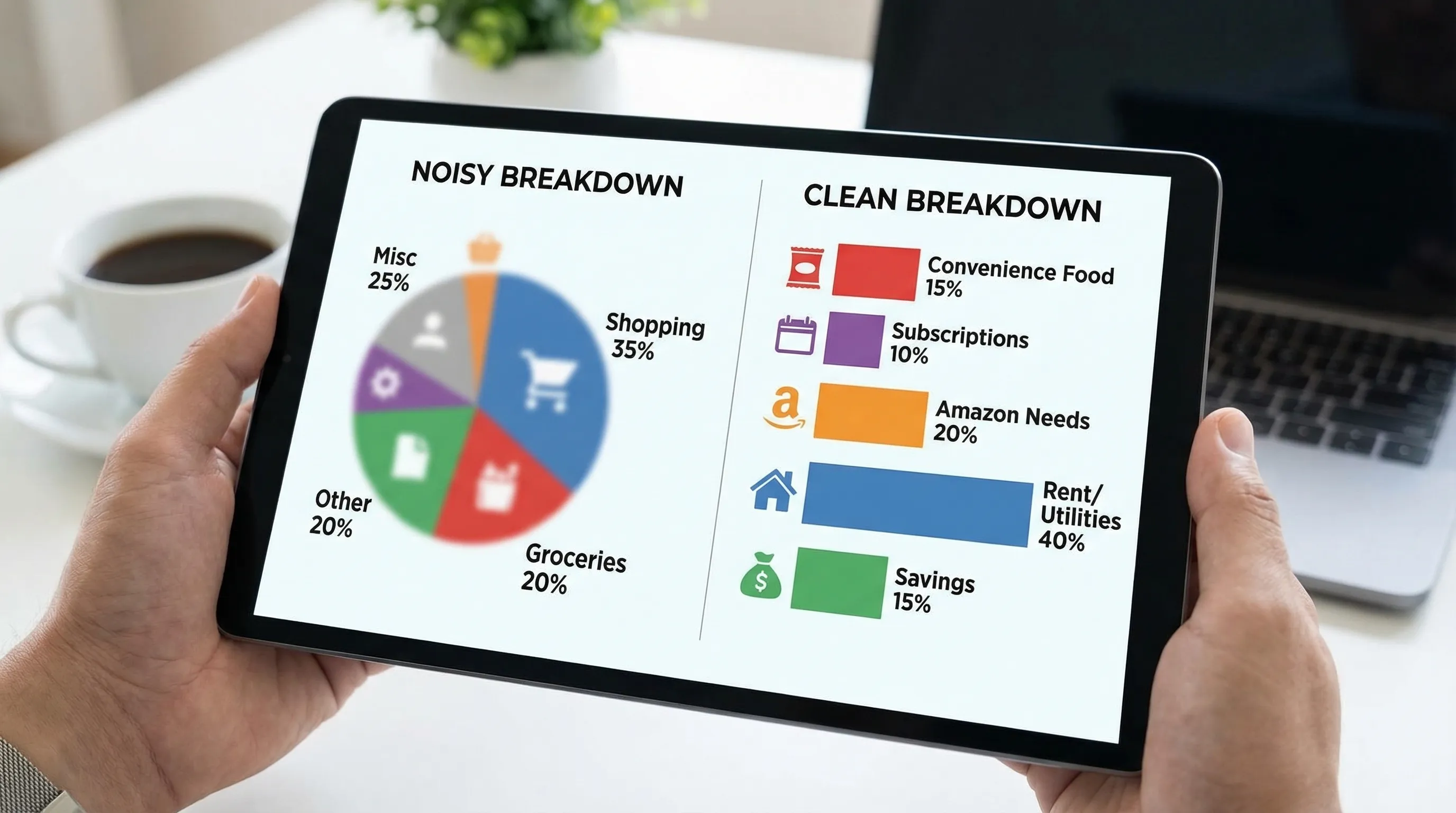
Custom categories don’t mean “more categories”
Let’s kill a myth.
Custom categories are not about turning your budget into a taxonomy project. You’re not building the Library of Congress. You’re building a dashboard that helps you drive.
Think “fewer, smarter.”
A clean system is usually:
- A handful of category groups (big buckets)
- 8 to 15 categories (decision levers)
- Optional labels (context, projects, one-offs)
This is where tools like FIYR shine: you can create custom categories (and groups), then automate them with transaction rules so you’re not manually tagging your way into madness.
The real payoff: custom categories turn spending into a strategy
Here’s what happens when categories get specific:
- You stop negotiating with your bank balance
- You see patterns faster
- You catch “small leaks” before they become lifestyle
- You can actually run experiments (cap, swap, automate)
And if you’re tracking FIRE, it gets even better.
Custom categories make your FIRE numbers less fake
Your projected FIRE date is only as accurate as your spending data.
If half your life is sitting in “Shopping,” you’re basically forecasting retirement using vibes.
Even small clarity upgrades create outsized results.
Example: you create a category called Convenience Food (delivery, drive-thru, snacks-that-aren’t-a-meal).
You discover you’re spending $200/month.
You cut it by half. That’s $100/month.
Invested instead at 7% for 20 years, $100/month is roughly $49k (back-of-napkin, but directionally real).
Not life-changing billionaire money, but absolutely “pay for a year of freedom” money.
One-liner: Precision turns guilt into math. Math turns guilt into power.
A practical framework: the “Category = Decision” method
If you want categories that produce insight, build them backward from decisions.
Step 1: Write down the 5 money decisions you actually make
Examples:
- “What can I cut quickly if things get tight?”
- “What’s quietly growing without me noticing?”
- “Which spending makes my life better, and which just numbs me?”
- “What should be capped?”
- “What needs a sinking fund?”
Those decisions are your category blueprint.
Step 2: Create categories that answer those decisions
Good categories are:
- Mutually exclusive (a transaction has one obvious home)
- Big enough to matter (ideally recurring and meaningful)
- Stable (you will still use them in 6 months)
- Actionable (they trigger a next step)
Here’s a cheat sheet that makes the difference obvious:
| Generic category (noise) | Better custom category (signal) | What it lets you do |
|---|---|---|
| Shopping | Amazon Needs | See household essentials vs impulse |
| Shopping | Amazon Wants | Put a hard cap on “random stuff” |
| Restaurants | Convenience Food | Attack the “too tired to cook” tax |
| Food | Work Lunch | Decide meal prep vs office habits |
| Bills | Subscriptions | Run a monthly subscription audit |
| Auto | Fuel | Track driving behavior and efficiency |
| Auto | Repairs + Maintenance | Build a sinking fund before pain hits |
| Misc | Fees + Interest | Declare war on penalties and APR |
Step 3: Use labels for context, not chaos
Labels are for “this was a special thing,” without exploding your category list.
Examples:
- “New York Trip 2026”
- “Baby Prep”
- “Kitchen Remodel”
- “Wedding Season”
Categories should stay stable. Labels capture the storyline.
If you’re using FIYR, this combo is especially powerful because you can keep categories clean (for trend accuracy) while still getting detailed breakdowns by label.
Quotable truth: Categories are the map. Labels are the pins.
The 30-minute category upgrade (no spreadsheets, no suffering)
You don’t need a weekend retreat and a color-coded Google Sheet. You need one focused sprint.
1) Pull your last 60 to 90 days of transactions
You’re looking for reality, not your self-image.
2) Identify your “Top 10 merchants”
These are usually the villains and the VIPs.
Amazon. Costco. Target. Uber. DoorDash. Starbucks. Apple. Your local “just one thing” store.
3) Create 3 custom categories (only three)
Start with the highest leverage.
Good starters for most people:
- Subscriptions (or split into “Streaming” and “Software” if you’re subscription-heavy)
- Convenience Food
- Fees + Interest
Then add one category that matches your life stage:
- Families: Childcare or School + Activities
- Freelancers: Client Tools or Business Expenses
- FIRE-focused: Travel (because it tends to sneak upward)
4) Add transaction rules so the system runs without you
Rules are the difference between “custom categories” and “I gave up after Tuesday.”
Merchant-based rules (Amazon, Uber, Comcast) get you 80% of the benefit.
5) Create a “Needs Review” holding category
This is where weird stuff goes so your main categories stay clean.
Then, once a week, you clean it up in 10 minutes like an adult who wants options.
That’s the system.
One-liner: A budget you can’t maintain is just a guilt subscription.
Common custom category mistakes (and how to not be that person)
Mistake 1: Over-categorizing to feel in control
If you have separate categories for “Coffee with oat milk” and “Coffee with regret,” you’re doing too much.
Fix: Merge until categories are decision-sized.
Mistake 2: Creating categories that are identity statements
“Healthy Lifestyle” is not a category. It’s a vision board.
Fix: Track behaviors, not aspirations. Try “Groceries” and “Convenience Food.” Reality first.
Mistake 3: Letting “Misc” become a black hole
“Misc” is where insight goes to die.
Fix: If “Misc” is consistently more than 2 to 5% of spending, it’s telling you to create a new category.
Mistake 4: Not separating true expenses
Car insurance, annual renewals, holidays, back-to-school, medical bills.
Fix: Create categories (or sinking funds) that let you monthly-ize the pain.
Why this matters for Mint refugees (and anyone sick of legacy apps)
A lot of people coming from Mint, Quicken, or other legacy tools have the same complaint:
- “It tracks stuff, but it doesn’t help me do anything.”
That’s not a tracking problem. It’s a categorization problem.
Modern money management needs:
- Custom categories that match real life
- Rules to automate the boring stuff
- Clean reporting that shows trends, not clutter
- FIRE-relevant metrics like savings rate, net worth, and a realistic timeline
FIYR is built around that reality: flexible custom categories, transaction rules, subscription tracking, net worth tracking, and FIRE-focused insights, without turning your financial life into a part-time job.
And yes, it’s a modern alternative to Mint, Monarch Money, Copilot, Rocket Money, and Quicken. But the bigger point is this: the tool matters less than the principle.
If your categories produce noise, your budget produces lies.The bottom line
Custom categories aren’t cosmetic. They’re strategic.
They take you from:
- “I spend too much”
To:
- “I spend $312/month on convenience because my week is chaos, so I’m going to cap delivery, automate a grocery order, and redirect $150 to Future Me.”
That’s insight. That’s control. That’s how financial independence actually happens, not through willpower, but through systems that tell the truth.
Final one-liner to keep: The goal isn’t to track every dollar. It’s to make every dollar confess.