Best Net Worth Tracker for 2026: Honest Comparison + What to Look For
Most people think tracking net worth is easy, then their “total” swings five figures because a credit card payment got counted twice. Net worth is the scoreboard of your money life, and in 2026 the question is not spreadsheets versus apps, it is accuracy versus illusions.
The uncomfortable truth
A pretty dashboard with bad math is expensive wallpaper. If your tracker misses accounts, mislabels transfers, or ignores “hidden” assets, it is lying to you. And when the numbers lie, your decisions follow.
Meet Priya. Spreadsheet warrior. Tabs color coded, pivot tables tighter than TSA. She still missed an HSA balance, double counted card payments, and forgot prepaid travel credits. When she finally reconciled correctly, her net worth jumped 18,000 dollars overnight. Nothing changed in her life except the math.
Here is why this matters. Roughly 60 percent of Americans are still living paycheck to paycheck, according to CNBC reporting, and stress follows sloppy money systems. Clean net worth math does not solve everything, but it gives you a compass, not vibes.
Source: CNBC
What to look for in a net worth tracker in 2026
Think in three axes: accuracy, customization, automation. Then layer in context and portability.
- Accuracy, how reliably your balances, transactions, and transfers are represented. Transfer handling, duplicate suppression, pending transactions, reconciliation tools, and manual edits all matter.
- Customization, whether you can model your real life. Custom assets and liabilities, labels or tags, hidden assets, exclusions, multi-currency, business versus personal separation.
- Automation, how much happens without you. Bank connections, auto categorization, rules, scheduled reminders, subscription detection, and recurring updates.
- Context, your net worth should tie to a budget, savings rate, and goals. Reports without behavior change are finance cosplay.
- Portability, easy export, audit trail, and you own the data. Future you will thank you.
Pull these levers well and your tracker becomes a flywheel, not a chore chart.
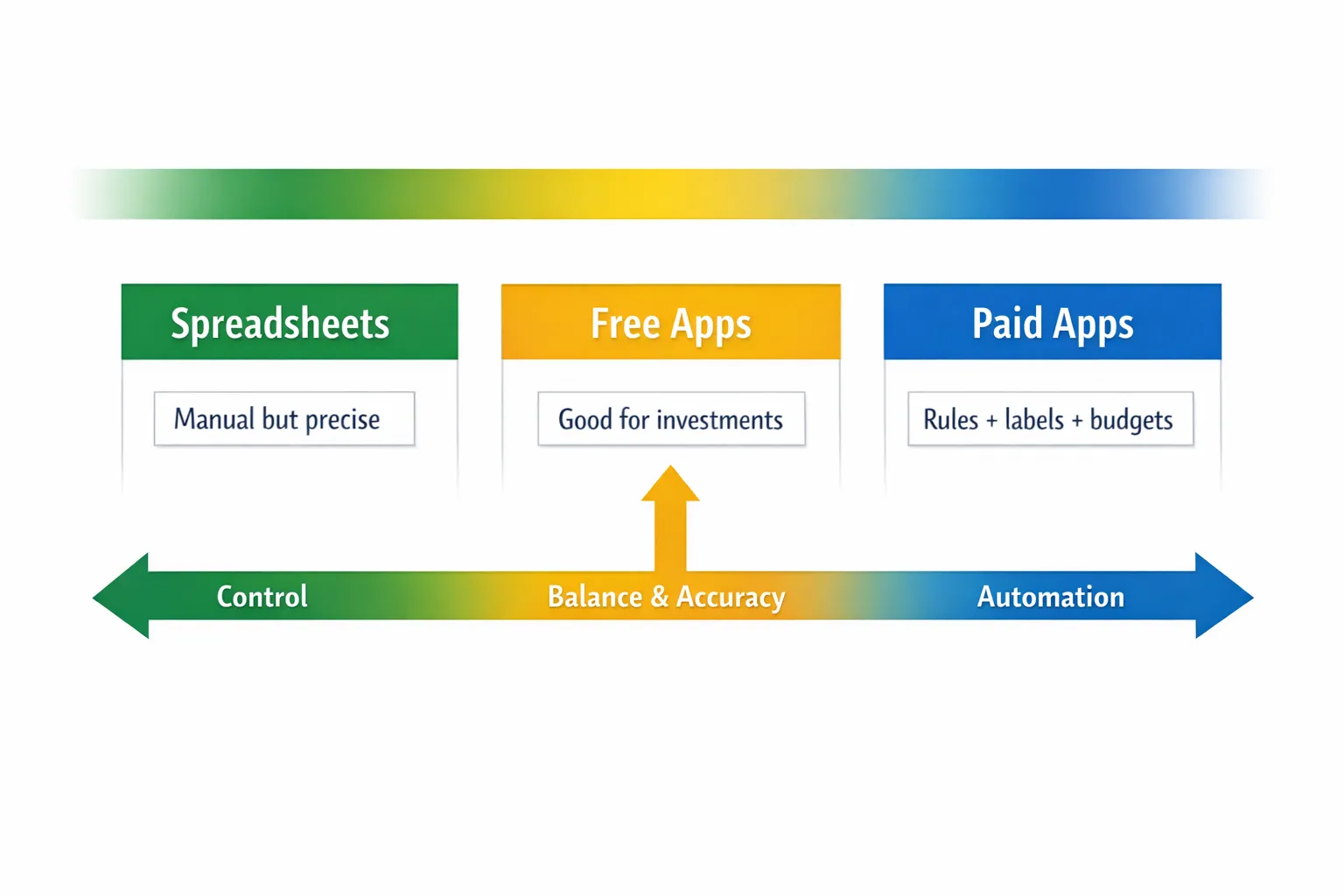
Spreadsheets vs free apps vs paid apps, who actually wins?
Short answer, none universally. Long answer, pick the tool that matches your failure mode.
- If you love control and do monthly reconciliation, spreadsheets are elite. If you are allergic to manual steps, you will ghost the workflow by February.
- Free apps give you a broad view, often great investment analysis, sometimes limited customization. They may be enough if you are light on edge cases.
- Paid apps blend automation with control. The magic is rules, labels, custom assets, and clean transfer logic. The trade off is a subscription fee that should pay for itself in fewer mistakes and better decisions.
The 2026 comparison, honest and to the point
Features change, test your own accounts. The ratings below reflect typical usage patterns for each category.
| Tool | Type | Accuracy | Customization | Automation | Cost | Best for |
|---|---|---|---|---|---|---|
| DIY Spreadsheet (Google Sheets, Excel) | Spreadsheet | High if disciplined | Very high | Low | Free or one time | Builders who love control and reconciliation |
| Tiller | Spreadsheet automation | High | High | Medium | Paid | Spreadsheet fans who want automatic imports |
| Empower Personal Dashboard | Free app | Medium to high | Medium | Medium | Free | Investors who want a big picture with minimal setup |
| Monarch Money | Paid app | High | High | High | Paid | Families and power users who want rules and planning |
| Copilot Money | Paid app | High | Medium to high | High | Paid | iOS first users who want smart automation |
| Quicken Simplifi | Paid app | Medium to high | Medium | High | Paid | Quicken alumni who want a modern take |
| MoneyPatrol | Paid app | Medium to high | Medium | High | Paid | Users who want alerts and dashboards with quick setup |
| YNAB | Paid app | High for budgets, medium for net worth | Medium | Medium | Paid | Envelope budgeters who still want net worth reports |
| Rocket Money | Paid app | Medium | Medium | Medium to high | Paid | Subscription hunters and bill negotiators |
| FIYR | Paid app | High | High | High | Paid | FIRE focused users, savings rate, goals, and custom assets |
Note, accuracy assumes you reconcile transfers, for example, card payments as transfers to liabilities, not spending. Any tool can be wrong if the rules are wrong.
Quick takes, where each category shines and breaks
Spreadsheets
- Strengths, total control, custom asset types, business and personal separation, exact valuation logic. Nothing obfuscates, everything is explicit.
- Weaknesses, manual imports unless you layer tools, prone to user error, no mobile alerts. If you fall behind, the backlog is brutal.
Free apps
- Strengths, account aggregation, broad dashboards, often excellent investment views. Zero cost to start.
- Weaknesses, limited labels or rules, transfer logic varies, fewer custom asset types. You may force your life into their structure.
Paid apps
- Strengths, automation plus control. Custom assets, transaction rules, labels, multi account budgets, snapshots, and goal tracking.
- Weaknesses, subscription cost, plus you still need a monthly close ritual. Magic without maintenance is still a magic trick.
If you want a quick way to try a paid dashboard with alerts, budgets, and net worth in one place, review MoneyPatrol pricing and free trial to see if the setup fits your workflow.
Accuracy, the part nobody talks about
Most net worth errors come from three leaks.
- Transfers, card payments and bank to bank moves get counted as spending. Fix with explicit transfer categories and rules.
- Duplicates, aggregator hiccups clone a transaction. You need bulk dedupe and a monthly variance check.
- Missing or messy assets, HSAs, gift cards, travel credits, deposits, crypto held at a niche platform, and business receivables fall through the cracks.
Pro tip, set a monthly reconciliation checklist and stick to it. If you do not reconcile, you are not tracking.
Customization, model your real life or the model drives you
If you cannot add it, you will ignore it. Look for, custom assets and liabilities, labels or tags for projects and trips, hide from net worth flags, multi currency, business versus personal toggles, and the ability to exclude asset classes from charts.
If you have “weird” stuff, for example, TreasuryDirect, HSA, prepaid tuition, miles and points, crypto cold storage, taxable brokerage at a smaller custodian, you need custom entries and repeatable valuation rules. Our guide to hidden assets most people forget helps you build that list.
Automation, useful, until it is not
Automation should do the boring parts and never block the truth. Non negotiables, reliable account connections, scheduled refresh, transaction rules, transfer detection, and easy manual overrides. Optional nice to haves, subscription detection, bill reminders, and monthly snapshots. If an app cannot do labels or rules, automation becomes noise.

The 30 minute Net Worth OS, set it up once, maintain it forever
You can do this today. Your future self will write you a thank you note.
1, Decide what counts. Assets minus liabilities, everything with monetary value. Include checking, savings, investments, retirement, real estate, vehicles, HSAs, cash value life insurance, business equity, and true store value like prepaid cards or travel credits you will use. Exclude things you will not sell or cannot value reasonably.
2, Create valuation rules. Real estate, use a conservative estimate or the lower of two sources. Vehicles, a mid range market estimate. Crypto, spot price from a reliable source. Business equity, book value unless you have a real valuation. Document the rule next to the asset name.
3, Map your transfers. Card payments, internal bank moves, brokerage transfers, debt payments, reimbursements. Create transfer categories and rules so these do not show up as spending or income.
4, Add labels for big themes. “New York Trip 2026,” “Basement Remodel,” “Coast FIRE Fund.” Labels make reports meaningful.
5, Build your monthly close ritual. Refresh connections, reconcile accounts, update manual assets, snapshot net worth, review savings rate and next month’s plan. Fifteen minutes, on the calendar.
If you want this tied directly to a financial independence plan, FIYR tracks income and expenses, budgets with dynamic caps, custom categories, labels for trips and projects, subscription tracking, net worth, savings rate, and a FIRE date projection. It also supports custom assets and liabilities so your life fits the model, not the other way around.
Mini reviews, the honest pros and cons by use case
- Tiller, spreadsheet power without CSV drudgery. Great for builders who want formulas and custom tabs. Still requires monthly care.
- Empower Personal Dashboard, strong for investment and fee analysis, easy overview across institutions. Less flexible for custom assets or labels.
- Monarch Money, rules, goals, and polished reports. Good family workflows. Solid for people migrating from Mint who want control.
- Copilot Money, thoughtful automation and clean categorization. A good fit if you live on Apple devices.
- Quicken Simplifi, the Quicken lineage with a modern interface. Familiar mental model for longtime users.
- MoneyPatrol, dashboards, alerts, budgets, and net worth in one place with a free trial, worth testing if you want quick visibility and reminders.
- YNAB, elite for envelope budgeting. Net worth tracking exists, best if budgets are your top priority and net worth is a report, not the core tool.
- Rocket Money, solid for subscription management and bill negotiation. Net worth is decent if you connect everything cleanly.
- FIYR, built for FIRE math. Savings rate, safe to spend, goals, and a FIRE date calculator alongside net worth, good for people who want decisions tied to independence timelines.
Accuracy checklist you can steal
- All accounts present, banks, brokerages, retirement, HSA, credit cards, loans, and any niche platforms.
- Transfers rules working, card payments and bank to bank moves tagged as transfers, not spending.
- Manual assets updated, real estate, vehicles, crypto wallets, business equity, prepaid balances.
- Variance check, this month versus last month by account and total. Large swings should have a reason.
- Snapshot saved, a monthly net worth snapshot with notes on any one time events.
Common pitfalls and simple fixes
- Counting credit card payments as expenses, treat them as transfers to the liability. Spending happens at the transaction level, not the payment.
- Ignoring hidden assets, HSAs, gift cards, travel credits, tax refunds in progress. Track them to avoid false dips.
- Letting automation override reality, if an import is wrong, fix the rule. Tools are assistants, not oracles.
- Pricing paralysis, pay for a tool that saves you more than it costs in time, errors, and missed opportunities.
How to choose in 3 minutes
- If you love building systems and will reconcile monthly, go spreadsheet or Tiller.
- If you want a free overview and you are light on edge cases, try Empower first.
- If you want automation plus custom assets, labels, budgets, and goals in one place, pick a paid app like Monarch, Copilot, FIYR, or MoneyPatrol and run a 30 day trial.
Here is the kicker, your best tool is the one you will use every month. Consistency beats any feature list.
FAQs
How often should I update my net worth? Monthly is the sweet spot. Weekly is noise, quarterly is lagging. Put it on your calendar. Should I include my primary home and cars? Yes, if you can value them consistently. Use conservative estimates and be consistent in your method. What about miles and points? Track only if you regularly redeem and they hold real spending power for you. Be conservative, or keep them in a separate dashboard. How do I avoid double counting with credit cards? Treat card payments as transfers to the card liability. Spending is recorded when the charge happens, not when you pay the bill. Is a free app good enough? Often, yes. If your situation is simple and you just need visibility, a free tool works. As complexity grows, customization and rules in a paid app can be worth it.The last word
Your budget is your behavior, your net worth is your trajectory. Build a system that tells the truth, then check it every month.
If you want that truth tied to financial independence milestones, FIYR brings budgets, rules, labels, subscription tracking, savings rate, net worth, and a FIRE date calculator into one place. It is not the only way, just a fast way to go from data to decisions.
Choose your lane, set your ritual, and let compound progress do the heavy lifting.